
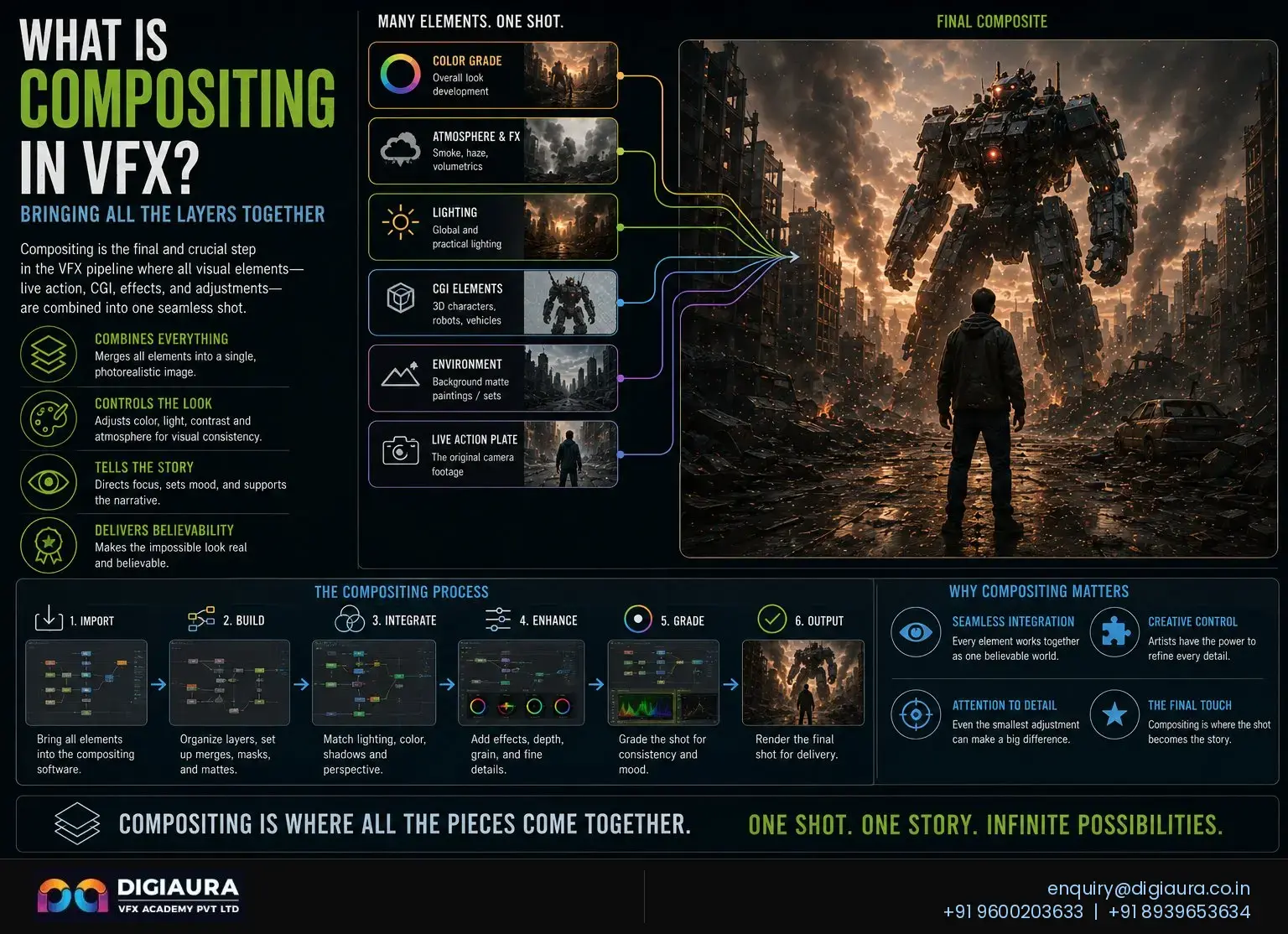
Every stunning VFX shot you see on screen a CGI army marching across a real landscape, a digital building exploding in downtown Mumbai, a creature standing in sunlight on a practical set is not a single unified image. It is dozens, sometimes hundreds, of separate elements assembled with pixel-level precision into something the human eye cannot distinguish from reality. That assembly process is called compositing, and the artists who do it are the last craftspeople to touch every VFX shot before it reaches the colour grade. Explore VFX courses at DigiAura Academy →
Key Takeaways
- VFX compositing is the process of combining multiple visual elements live-action plates, CGI renders, rotoscoped mattes, matte paintings, and practical effects into a single cohesive final frame that appears to have been photographed in one location at one time.
- Compositing sits at the end of the VFX pipeline and receives deliverables from every upstream department: matchmove, CGI, lighting, FX simulations, rotoscopy, and paint and prep.
- The two fundamental compositing approaches are node-based (Nuke, Fusion) and layer-based (After Effects). Professional VFX studios use node-based compositing exclusively for feature film and high-end television work.
- Multi-pass compositing assembles a final beauty image from individual render passes (diffuse, specular, shadow, ambient occlusion, Z-depth, reflection), giving compositors granular control over every lighting and shading component.
- Foundry Nuke is the industry-standard compositing application used by virtually every major VFX studio worldwide. Blackmagic Fusion is the preferred learning alternative due to its node-based workflow and free entry tier.
- VFX compositor salaries in India range from ₹2.4–3.5 LPA at entry level to ₹18–30+ LPA for compositing supervisors. Experienced mid-level compositors earn ₹6–10 LPA (GUVI/Glassdoor, 2026).
- India's VFX sector is projected to reach USD 3.8 billion by 2026 (FICCI-EY), with South Indian cinema accounting for 42% of domestic VFX demand making Chennai a strategically important location for compositing careers.
What Is Compositing in VFX?
Compositing in visual effects is the discipline of combining two or more image elements into a single unified frame that appears to have been photographed in one place at one time. The term originates from the word "composite," meaning something made up of distinct parts, and the practice predates digital technology by more than a century optical compositing using physical film printers and matte paintings existed in Hollywood as early as the 1920s. Today, digital compositing is the standard and sits at the terminus of every VFX production pipeline.
In a modern VFX production, a compositor receives the following elements for a single shot: the live-action plate (the footage of real actors on a real or partial set), CGI renders from the 3D department, rotoscoped mattes from the roto team, paint and prep clean plates, atmospheric elements such as dust, smoke, or haze, and colour reference data from the DI (digital intermediate) department. The compositor's task is to assemble all of these into a seamless image in which every element appears to exist in the same physical space, under the same lighting conditions, observed through the same camera lens.
Citation Capsule: Digital compositing is the process of digitally assembling multiple images to make a final image, typically for print, motion pictures, or screen display. It is the digital analogue of optical film compositing. The key challenge in compositing is making the individual source elements appear to belong together in a unified physical and photographic space.
What distinguishes compositing from simple image layering is the depth of integration required. A compositor does not merely stack images on top of each other. They match the colour science of real and digital elements, integrate lighting so that CGI shadows fall correctly on practical surfaces, apply lens characteristics such as depth of field, chromatic aberration, and lens distortion uniformly across all elements, and ensure that the grain structure and motion blur of digital elements match the photographic quality of the live-action plate. The goal is photographic unity not artistic combination, but forensic integration.
Where Compositing Fits in the VFX Pipeline
Compositing is the final creative department in the VFX production pipeline. It receives deliverables from every upstream discipline and is responsible for the output that goes to the director, the DI facility, and ultimately the screen. Understanding where compositing sits relative to other VFX disciplines clarifies both its scope and its dependencies.
| Pipeline Stage | Department | What Compositing Receives |
|---|---|---|
| 1. Acquisition | Camera / Set | Live-action plate (primary footage, green screen elements) |
| 2. Tracking | Matchmove | Solved camera data, undistorted plates, scene geometry |
| 3. Mattes | Rotoscopy | Frame-accurate alpha mattes isolating subjects from backgrounds |
| 4. Cleanup | Paint and Prep | Clean plates, wire removals, rig removals, beauty work |
| 5. CG Elements | 3D / Lighting / FX | Render passes (EXR multi-channel files), FX simulations, matte paintings |
| 6. Integration | Compositing | Assembles all elements into the final image; delivers to DI |
This pipeline position gives compositing both power and accountability. A compositor can mask errors from upstream departments through careful colour work and atmospheric integration, and a great compositor can elevate a mediocre CGI render into something that reads convincingly on screen. Conversely, the compositing department cannot compensate for fundamentally incorrect matchmove data or mattes with poor edge quality it sits downstream of those disciplines and inherits their errors.
How Does VFX Compositing Work? The Step-by-Step Process
A compositing shot in professional production moves through a structured sequence of operations. While every shot presents unique challenges, the core workflow follows a consistent logic that mirrors the physics of photography and lighting.
- Step 1: Plate Assessment and Setup. The compositor receives the undistorted live-action plate, reviews the brief, and assesses what elements need to be integrated. They check the colour space, frame rate, bit depth, and any technical notes from the matchmove and camera departments. The comp is set up in the correct linear colour space typically ACES or linear EXR so that all mathematical operations produce physically accurate results.
- Step 2: Keying and Matte Generation. If the shot involves green or blue screen footage, the compositor extracts a key a matte that separates the subject from the background using the colour of the screen. Software keyers analyse hue, saturation, and luminance to produce a clean alpha channel. For complex edges like hair, fur, or translucent fabric, the keyed matte is often supplemented or replaced by a hand-drawn roto matte from the rotoscopy department.
- Step 3: Render Pass Assembly. CGI elements arrive as multi-channel EXR files containing separate render passes. The compositor assembles these passes mathematically, recombining diffuse, specular, shadow, ambient occlusion, reflection, and refraction into a beauty pass that can be adjusted independently. This is the core technical operation that distinguishes professional compositing from simple layering.
- Step 4: Colour Matching and Light Integration. The compositor colour matches the CGI elements to the live-action plate, ensuring that both exist in the same apparent lighting environment. This involves matching the colour temperature of light sources, adjusting shadow density to match the practical lighting on set, and applying colour grading that makes digital and practical elements indistinguishable.
- Step 5: Photographic Integration. Real-world photographic characteristics depth of field, motion blur, lens flare, chromatic aberration, lens vignette, and film grain are added to CGI elements to match the optical properties of the live-action footage. A CGI element that is rendered crisp and clean will always look fake next to photographed footage that has natural optical imperfections.
- Step 6: Atmospheric and Environmental Integration. Atmospheric haze, heat shimmer, volumetric light shafts, and environmental fog are added to tie CGI elements into the depth of the environment. Objects in the distance should have atmospheric perspective; objects in direct sunlight should have matching specular hot spots.
- Step 7: Final Grade and Delivery. The completed composite is graded to match the overall look of the sequence, checked for any residual keying artifacts, edge errors, or colour mismatches under full-screen review, and rendered for delivery to the DI facility in the required deliverable format typically a sequence of 16-bit or 32-bit EXR files at the specified resolution.
What Are Render Passes in VFX Compositing?
Render passes also called AOVs (Arbitrary Output Variables) or render elements are the individual lighting and shading components of a 3D render, output as separate image layers that a compositor can combine and adjust independently. Understanding render passes is fundamental to professional compositing because it is the primary mechanism by which compositors interact with CGI elements at a per-component level.
When a 3D artist renders a CGI object in a production renderer such as Arnold, V-Ray, or RenderMan, the renderer does not produce just one final image. It produces a multi-channel EXR file containing separate image layers for each lighting and shading component. The compositor then recombines these passes using mathematical operations primarily additive blending to reconstruct the final beauty image, but with the ability to adjust each component independently before combining.
| Render Pass | What It Contains | Compositor Use |
|---|---|---|
| Beauty Pass | The combined final render image (all passes summed) | Starting reference; replaced by manual pass assembly for control |
| Diffuse / Albedo | Base colour of surfaces under diffuse lighting | Colour matching; adjusting surface colour without affecting highlights |
| Specular | Shiny highlights from light sources | Boosting or reducing highlight intensity to match plate lighting |
| Shadow | Shadows cast by the CGI object onto surfaces | Integrating CG shadows onto the live-action plate ground plane |
| Ambient Occlusion (AO) | Contact shadows in crevices and concave areas | Adding depth and weight; preventing CGI from appearing to float |
| Z-Depth | Greyscale image encoding distance from the camera | Generating depth-of-field blur and atmospheric haze in comp |
| Reflection | Environment reflections on shiny surfaces | Replacing with correct environment light probe for the plate location |
| Cryptomatte / ID | Object identity masks (each CG object as a separate mask) | Isolating specific objects for per-object colour work or masking |
The ability to manipulate each pass independently before combining is what gives professional compositors fine-grained control over the final image. A compositor can brighten only the specular highlights on a creature without affecting its diffuse colour, or they can boost the ambient occlusion in the contact area between a CGI vehicle and the ground plate to make it read as physically grounded. This level of control is not possible when working with a flat beauty render.
Core VFX Compositing Techniques
VFX compositing encompasses a range of specific techniques, each addressing a different type of integration challenge. Professional compositors are fluent in all of them and know when to apply which approach to a given shot.
Chroma Keying (Green Screen / Blue Screen)
Chroma keying is the process of extracting a matte from footage shot against a uniformly coloured background typically green or blue by sampling the hue and luminance of that background colour and using it to generate an alpha channel that separates the foreground subject. Green is preferred for digital workflows because the green channel carries the most luminance information in a Bayer-pattern sensor, producing a cleaner, less noisy key. Blue screen is used when the subject contains green elements such as a character wearing green armour that would conflict with a green key.
Quality keying requires well-lit, even screen illumination with no hot spots, spill control to remove the colour cast that a green screen projects onto the edges of the subject, and careful edge treatment to preserve fine detail such as hair strands, translucent fabric, and motion-blurred edges. Production keyers in Nuke (Primatte Keyer, Keyer node) and After Effects (Keylight) provide multi-step matte generation workflows. For difficult subjects, compositors combine chroma keys with hand-drawn roto mattes from the rotoscopy department.
Rotoscopy Integration
Rotoscoped mattes frame-by-frame hand-drawn alpha channels from the rotoscopy department are used in compositing to isolate subjects filmed on practical sets without a clean screen, or to supplement keyed footage at difficult edge areas. A compositor receives roto mattes as EXR or TIFF sequences and uses them as holdout mattes to define exactly which pixels of the live-action plate belong to the foreground subject versus the background.
Matte Painting Integration
Digital matte paintings are high-resolution painted or photographic extensions of a filmed environment a mountainous horizon replacing a car park, a medieval city extending beyond a practical street set, or a complete alien landscape behind a studio window. Compositors integrate matte paintings by matching their perspective to the camera solve from the matchmove department, projecting the painting onto geometry that moves in three-dimensional space with the camera, and colour matching the painting to the practical plate at the seam where they meet.
Light Wrap
Light wrap is a compositing technique that simulates the way background light bleeds onto the edges of a foreground subject when both exist in the same physical environment. When a bright sky is behind a CGI character, the character's edges should have a soft fringe of sky colour from light bouncing around them. Without light wrap, CGI elements appear to be pasted on top of the background rather than existing within it. Light wrap is typically achieved by blurring the background image significantly and blending a softened version of it into the edge regions of the foreground element.
Colour Matching and Grade
All elements entering a composite live-action plate, CGI renders, matte paintings, practical effects elements need to exist in the same apparent colour and lighting environment. Compositors use colour matching tools to match the overall tone, contrast, and colour temperature of digital elements to the plate. Production compositing is performed in linear colour space (where pixel values correspond directly to physical light intensity) to ensure that colour operations are mathematically accurate. The final composite is then transformed into the deliverable colour space for the DI grade.
Node-Based vs Layer-Based Compositing: What Is the Difference?
The two primary approaches to organising compositing operations are node-based and layer-based. The choice of approach has significant consequences for the complexity of shots that can be handled, the efficiency of the artist's workflow, and the scalability of the composite when changes are requested.
Layer-Based Compositing
In a layer-based compositing application such as Adobe After Effects, elements are stacked vertically in a timeline as layers. Operations colour corrections, blurs, effects are applied to individual layers as effects stacked in a list. The image is rendered by compositing layers from bottom to top, with blend modes controlling how each layer interacts with those beneath it. Layer-based compositing is intuitive, visually organised, and well-suited to motion graphics work where the structure of a composition maps naturally to a layer stack.
The limitations of layer-based compositing become apparent on complex VFX shots. When a shot has 50 or 100 elements, a layer stack becomes extremely difficult to navigate and edit. Connecting an operation in one layer to data from another layer requires workarounds, and the linear top-to-bottom processing order means that certain operations particularly those that require multi-source data are cumbersome to implement correctly.
Node-Based Compositing
In a node-based compositing application such as Foundry Nuke or Blackmagic Fusion, every operation is a discrete node a box representing a single function connected to other nodes by wires that represent data flow. An image travels through the node network as a stream of pixel data, being modified by each node it passes through before arriving at the output. The result is a non-linear network diagram that can represent arbitrarily complex operations with complete transparency about data flow.
Node-based compositing scales to any level of shot complexity without becoming unmanageable, allows any output of any node to be connected to any input of any other node (enabling creative and technically precise operations that are impossible in layer-based software), and makes the compositing process completely non-destructive any node in the network can be modified at any time without affecting unrelated parts of the composite. All major VFX studios worldwide use node-based compositing for production shots.
| Feature | Node-Based (Nuke/Fusion) | Layer-Based (After Effects) |
|---|---|---|
| Scalability | Handles hundreds of elements cleanly | Becomes complex past 20-30 layers |
| Data Flow | Non-linear; any output to any input | Linear; top-to-bottom processing order |
| Multi-Channel EXR | Native support for all render passes | Limited; requires third-party plugins |
| Colour Science | Full linear/ACES workflow native | Gamma-based; linear requires setup |
| Studio Use | Standard for all feature film/TV VFX | Motion graphics, broadcast, indie |
| Learning Curve | Steeper initial learning curve | More intuitive for beginners |
VFX Compositing Software: The Professional Toolkit
The choice of compositing software defines the scale of work you can take on and the studios you can work for. Here is a definitive comparison of the four principal compositing applications used in professional VFX production:
| Software | Cost (2026) | Type | Best For | Learning Curve |
|---|---|---|---|---|
| Foundry Nuke | ~$5,219 / year (NukeX) | Node-based | Feature film, high-end TV VFX | Steep |
| Adobe After Effects | ~$600 / year (Creative Cloud) | Layer-based | Motion graphics, broadcast, indie | Moderate |
| Blackmagic Fusion Studio | $295 one-time | Node-based | Learning node workflow, indie VFX | Moderate |
| DaVinci Resolve Fusion | Free (Resolve Studio: $295) | Node-based | Beginners; colour + comp integration | Moderate |
Foundry Nuke: The Industry Standard
Nuke is the compositing application used by virtually every major VFX studio producing film and television content. Industrial Light and Magic, Weta FX, Double Negative, Framestore, MPC, Rodeo FX, and hundreds of other studios worldwide run their compositing departments on Nuke. It is the application that professional compositor job listings specify by name, and it is the tool that entry-level compositors must demonstrate proficiency in to be hired at production studios in India and internationally.
Nuke's dominance comes from its architecture: it was designed specifically for multi-channel, multi-pass EXR compositing at feature film resolution, with a 3D compositing environment, native stereoscopic support, and a Python scripting API that integrates with studio pipeline systems. NukeX, the professional tier, adds tools including CameraTracker (3D camera tracking from within Nuke), Kronos (optical flow retiming), and CaraVR (360-degree compositing).
Blackmagic Fusion: The Professional Learning Path
For students learning node-based compositing, Blackmagic Fusion (available free as part of DaVinci Resolve) is the recommended starting point. Fusion uses the same node-based paradigm as Nuke nodes, wires, viewers, and merge operations all function on the same logical principles and the skills learned in Fusion transfer directly to Nuke when you progress to professional studio work. The free tier supports full-resolution compositing with multi-channel EXR support, making it a complete learning environment for students who cannot access a Nuke licence.
Compositing in Indian Cinema: Baahubali, RRR, and the Chennai VFX Pipeline
India is one of the world's largest and fastest-growing VFX markets. The country's VFX sector is projected to reach USD 3.8 billion by 2026 (FICCI-EY Report), with South Indian cinema accounting for 42% of domestic VFX demand (Arena Nash, 2025). The compositing work behind blockbusters like Baahubali: The Conclusion, RRR, and Kalki 2898 AD represents the maturity of Indian VFX production and has benchmarked compositing quality at a global level.
Baahubali: The Conclusion (2017) used over 4,500 VFX shots produced by a combination of Indian studios and international partners. The compositing work involved integrating CGI armies, environments, water simulations, and particle effects across thousands of frames shot on location and on set. RRR (2022) went further, with its centrepiece action sequences requiring compositors to seamlessly integrate CGI animals, environmental destruction, and crowd simulations with live-action performance footage. Both films demonstrated that Indian VFX production pipelines, including compositing departments, are operating at a level comparable to international blockbuster standards.
Chennai specifically has emerged as a hub for VFX compositing work for Kollywood (Tamil cinema) productions, with studios handling both domestic projects and international outsourcing work. Spellbound VFX, the studio partner behind DigiAura VFX Academy, is an active participant in this pipeline meaning students trained at DigiAura work with real production tools, real shot briefs, and real quality standards.
VFX Compositor Career Path in India
Compositing is one of the most creative and technically complex disciplines in the VFX industry, and compositors are among the highest-paid VFX artists at every experience level. The career path follows a clear progression from entry-level roto-paint work through junior compositing to mid-level, senior, and supervisory roles.
| Role | Experience | India Salary (LPA) | Primary Responsibilities |
|---|---|---|---|
| Roto / Paint Artist | 0–1 yr | ₹2.4–3.5 LPA | Rotoscopy mattes, wire removal, clean plates |
| Junior Compositor | 1–3 yrs | ₹3.5–6 LPA | Simple integrations, prep shots, assist senior comps |
| Mid-level Compositor | 3–5 yrs | ₹6–10 LPA | Complex CGI integration, full-CG shots, keying |
| Senior Compositor | 5+ yrs | ₹12–20 LPA | Hero shots, client-facing reviews, technical solutions |
| Compositing Supervisor | 7+ yrs | ₹18–30+ LPA | Department oversight, pipeline decisions, client communication |
Salary data sourced from GUVI, Glassdoor India, and Arena Nash (2026). International compositing roles pay substantially more: the average annual salary for a VFX compositor in the United States is approximately USD 87,547 (ZipRecruiter, May 2026). The global VFX industry is expected to cross USD 30 billion by 2026 (FICCI-EY/DGMC), and India requires nearly 2 million skilled VFX professionals by 2030 (Arena Nash, 2025) creating sustained demand for trained compositors at every experience level.
Skills a VFX Compositor Needs to Get Hired
- Node-based compositing (Nuke or Fusion): Proficiency in the industry-standard workflow. Studios hire based on demonstrated ability to build a comp tree, work with multi-channel EXRs, and deliver integrated results.
- Keying and matte generation: Clean, production-quality keys from challenging green screen footage, including hair and motion-blurred edges. Understanding of despill, edge treatment, and matte combination.
- Colour science: Working knowledge of linear colour space, ACES, LUTs, and colour grading tools. An inability to match colours between digital and practical elements is the most common failure point for junior compositors.
- Render pass assembly: Understanding of which passes do what, how they are combined mathematically (additive, multiply), and how to manipulate individual passes to achieve a required look.
- Photographic knowledge: Understanding of depth of field, motion blur, lens characteristics, and film grain the physical properties that must be applied to CGI elements to make them match real-world footage.
- Roto and paint fundamentals: Most compositors at the junior level are expected to generate their own basic roto mattes and perform paint work on simple frames.
- Communication and review skills: Compositors present their work in daily client and internal reviews and must be able to respond to creative feedback and technical direction efficiently.
How to Learn VFX Compositing in India
Learning compositing requires a combination of technical knowledge, practical application on real footage, and mentorship from artists who work in production. The path from complete beginner to hireable compositor follows a clear progression:
- Foundation stage: Learn the fundamentals of image formation, colour science, and compositing theory. Understand what render passes are, how alpha channels work, and the mathematics of blending operations. Practice in Blackmagic DaVinci Resolve Fusion (free) to build node-based fluency.
- Software proficiency: Transition to Foundry Nuke and build a comprehensive understanding of its node architecture. Learn the Merge node hierarchy, the Grade and ColorCorrect nodes, the Roto and Rotopaint nodes, and the CameraTracker. Complete structured projects that cover keying, CGI integration, and colour matching.
- Production shots: The most important step. Work on real production-quality footage not tutorial placeholder images with real render passes, real roto mattes, and real quality standards. This requires either a structured training programme or direct industry exposure.
- Showreel development: Build a compositing showreel of 3–5 shots that demonstrate a range of technical and creative skills: one clean green-screen key, one CGI-into-plate integration with render passes, one environment extension, and one complex multi-element shot. Your showreel is your entry document to the industry.
- Studio training or structured programme: A structured course at a studio-backed VFX academy provides direct access to production-level tools, industry-standard briefs, and professional mentors. DigiAura VFX Academy's compositing courses are built and taught in collaboration with Spellbound VFX, a working production studio, ensuring that every exercise and project reflects actual production practice.
Compositing vs CGI: What Is the Difference?
The terms "CGI" and "compositing" are sometimes used interchangeably in popular media, but they refer to entirely different stages of the VFX process. CGI (Computer-Generated Imagery) is the creation of digital visual content 3D models, environments, creatures, simulations, and renders by 3D artists, lighters, and FX TDs. Compositing is the assembly of CGI, practical, and photographic elements into the final image.
To use a construction analogy: CGI is like manufacturing individual building materials bricks, glass panels, steel beams. Compositing is the assembly of those materials into the finished building. You cannot have a completed building without assembly, and the best materials in the world will look wrong if assembled incorrectly. A brilliant CGI render can be undermined by poor compositing, and skilled compositing can make a limited CGI render read as far more convincing than it actually is.
A VFX shot typically involves contributions from CGI, FX simulations, matte painting, rotoscopy, matchmove, paint and prep, and compositing departments. Compositing is the last of these and is responsible for making the sum of all these contributions into a unified, photographic final image.
Frequently Asked Questions About VFX Compositing
What is compositing in VFX?
Compositing in VFX is the process of combining multiple visual elements live-action plates, CGI renders, rotoscoped mattes, matte paintings, and practical effects into a single seamless final frame that appears to have been photographed in one location at one time. It is the final stage of the VFX pipeline before delivery to the DI grade.
What does a VFX compositor do?
A VFX compositor assembles the elements for each VFX shot: they key green screen footage, integrate CGI renders using render passes, colour match digital and practical elements, apply photographic integration (depth of field, grain, lens distortion), and deliver a final image that makes every element appear to exist in the same physical space. They are the last creative artists to touch a VFX shot.
What is the difference between compositing and CGI?
CGI is the creation of digital imagery by 3D artists: models, environments, simulations, and renders. Compositing is the assembly of CGI, practical, and photographic elements into the final image. CGI departments produce raw digital content; the compositing department integrates that content with live-action footage and delivers the final shot.
What is multi-pass compositing?
Multi-pass compositing is the technique of assembling a final CGI image from its individual render passes diffuse, specular, shadow, ambient occlusion, Z-depth, reflection rather than using the flat beauty render directly. This gives compositors granular control over every lighting and shading component, allowing independent adjustment of shadows, highlights, and colour without re-rendering.
Is Nuke better than After Effects for VFX compositing?
Yes, for production VFX work. Nuke is node-based, handles multi-channel EXR render passes natively, has full ACES colour science support, and scales to any shot complexity. After Effects is layer-based and is designed for motion graphics, broadcast, and indie work. All major feature film and television VFX studios use Nuke as their compositing standard.
Which compositing software should a beginner learn first?
Blackmagic DaVinci Resolve Fusion is the recommended starting point for beginners because it is free, node-based (teaching the same paradigm used by Nuke), and supports full-resolution multi-channel compositing. Once you are fluent in Fusion's node workflow, transitioning to Nuke for professional work requires learning its specific interface rather than relearning compositing from scratch.
How much does a VFX compositor earn in India?
VFX compositor salaries in India range from ₹2.4–3.5 LPA at entry level (roto/paint roles), ₹3.5–6 LPA for junior compositors, ₹6–10 LPA for mid-level compositors, ₹12–20 LPA for senior compositors, and ₹18–30+ LPA for compositing supervisors. Data sourced from GUVI and Glassdoor India, 2026.
How do I become a VFX compositor in India?
To become a VFX compositor in India: learn compositing theory and colour science fundamentals; build node-based workflow proficiency in Fusion or Nuke; complete structured training on real production footage with render passes and roto mattes; build a showreel of 3–5 polished shots; and enter the industry through a roto or paint role at a production studio to build experience towards a junior compositor position.
Is compositing a good career in India in 2026?
Yes. India's VFX market is projected to reach USD 3.8 billion by 2026, South Indian cinema represents 42% of domestic VFX demand, and there are over 98 active VFX compositing job listings in India on Glassdoor as of May 2026. The industry faces a large talent gap and trained compositors with production-quality showreels have strong employment prospects.
What is light wrap in VFX compositing?
Light wrap is a compositing technique that simulates background light bleeding onto the edges of a foreground subject, making it appear to exist within the same lighting environment as the background. It is achieved by taking a blurred, softened version of the background and blending it into the edge regions of the foreground element, creating a soft halo of background colour that grounds the composite naturally.
Compositing is where every discipline in VFX converges it is the point at which matchmoving, rotoscopy, paint and prep, CGI, and matte painting all combine into something greater than any of its parts. For students considering a VFX career, compositing offers one of the richest combinations of technical depth, creative problem-solving, and direct contribution to the final image that audiences see on screen. Talk to DigiAura's team about starting your compositing training →