
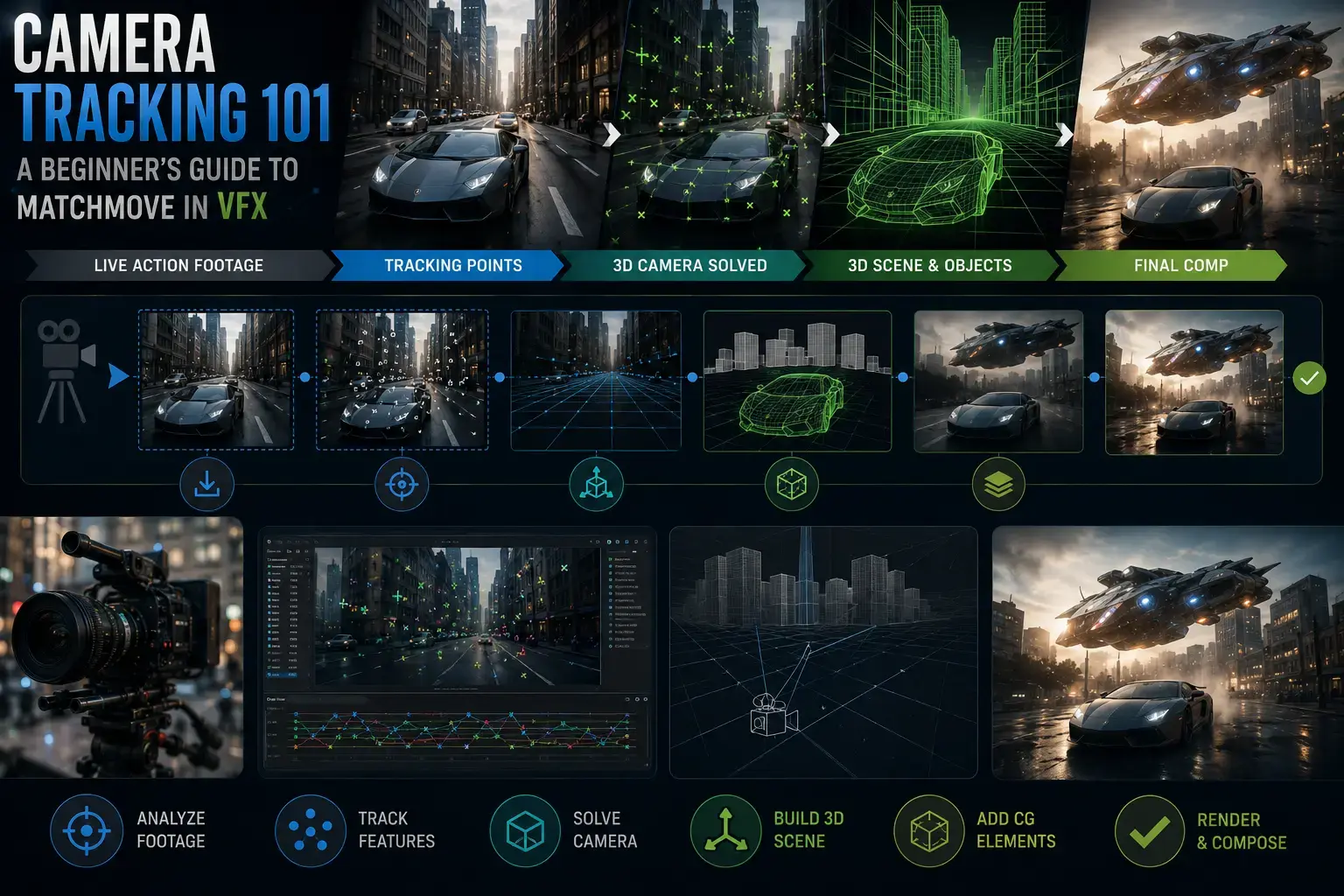
Every time you watch a superhero land on a rooftop, a digital creature walk through a real forest, or a spacecraft glide past a real building, you are watching matchmove in action. Camera tracking, also called match moving or matchmove, is the VFX technique that makes digital elements appear to live inside real-world footage. It does this by reverse-engineering the exact position, rotation, and movement of the camera that filmed the shot, then recreating that movement in 3D software so that computer-generated objects can be placed into the scene with perfect spatial accuracy. If you want to understand how modern blockbuster VFX works at its most fundamental level, or if you are exploring matchmove as a career path in India's growing VFX industry, this guide covers everything you need to know.
Key Takeaways
- Matchmove (also called camera tracking or match moving) is the process of replicating a real camera's movement inside 3D software so CG elements align perfectly with live-action footage.
- The process involves placing tracking markers on set, importing footage into software, solving the camera path mathematically, and passing the solve to 3D artists and compositors.
- Core matchmove software includes 3DEqualizer (industry standard), PFTrack (studio grade), SynthEyes (affordable), and Blender (free, beginner-friendly).
- Matchmove sits between on-set production and 3D departments in the VFX pipeline, making it a critical bridge discipline.
- Fresher matchmove artists in India earn Rs 15,000 to Rs 30,000 per month; senior artists and supervisors can earn Rs 1,00,000 or more per month according to Glassdoor India (February 2026).
- India's VFX segment is projected to reach Rs 48 billion by 2028 (FICCI-EY Report 2026), sustaining strong demand for trained matchmove artists.
- Matchmove is part of the RPM (Roto, Paint, Matchmove) artist bundle at many Indian studios, so learning it alongside rotoscopy and paint significantly increases employability.
What Is Matchmove in VFX?
Matchmove, short for match moving, is the VFX process of analysing a piece of live-action footage and mathematically recreating the movement of the camera that captured it inside a 3D digital environment. The result is a virtual camera in software like 3DEqualizer, PFTrack, or SynthEyes that moves exactly the way the real camera moved on set, including all its position changes, rotations, focal length shifts, and lens distortions.
Once the camera solve is complete and verified, the virtual camera data is exported into 3D applications like Autodesk Maya or Houdini, where 3D artists can build digital objects, creatures, or environments that are correctly positioned relative to the live footage. Because the virtual camera replicates the real one with mathematical precision, a CG spacecraft placed at a specific point in 3D space will appear to sit exactly in that position in the footage, moving correctly as the camera moves, with correct perspective shifts and parallax.
Matchmove is distinct from basic 2D tracking, which simply follows a point across the image plane. It is also distinct from rotomation, which matches a 3D character rig to a performer's body rather than recreating the camera. Matchmove is specifically about reconstructing camera geometry and motion in three dimensions.
How Camera Tracking Works: A Step-by-Step Breakdown
Camera tracking sounds complex because the underlying mathematics involves projective geometry and linear algebra. In practice, the workflow is methodical and learnable. Here is how a professional matchmove pipeline works from set to final solve.
Step 1: On-Set Preparation
Before the camera rolls, the VFX team or on-set supervisor places tracking markers in the scene. These are typically circular black-and-white targets stuck to surfaces or painted on the floor and walls. Markers give the tracking software high-contrast reference points that are easy to detect across multiple frames. A good marker layout covers as much of the shot's depth and width as possible, with markers at varying distances from the camera to give the solver enough parallax information to reconstruct 3D space. A lens chart is also filmed to measure lens distortion, which must be corrected before the solve begins.
Step 2: Footage Import and Lens Calibration
The matchmove artist imports the raw footage into tracking software and enters the camera's physical specifications: sensor size, focal length, and any relevant lens data. The software then applies a lens undistortion pass to remove the optical distortion introduced by the lens. Tracking on distorted footage produces inaccurate solves, so this step is non-negotiable on professional productions.
Step 3: Track Point Placement and Auto-Tracking
The artist places tracking points on the markers (or on natural features of the scene if no markers were used) and runs the auto-tracker. Modern software like 3DEqualizer and PFTrack uses feature detection algorithms to follow these points across frames. The artist reviews the automated tracks and manually corrects any that drift, slip, or lose their target due to occlusion, motion blur, or sudden camera moves.
Step 4: The Camera Solve
With a sufficient number of clean, well-distributed tracking points, the software runs a mathematical optimisation that calculates the 3D position of each tracked point and simultaneously reconstructs the path of the camera. This is the "solve". The output is a point cloud (a sparse 3D reconstruction of the scene) and a virtual camera with animated position and rotation data. The solve quality is measured by the residual error: how many pixels the reprojected track points deviate from their actual positions in the footage. A professional-quality solve typically has a residual under 0.5 pixels.
Step 5: Scene Orientation and Scale
The raw solve has no inherent sense of up, down, or scale. The artist orients the scene by defining the ground plane and sets real-world scale using known measurements from the physical set (for example, the height of a door or the distance between two markers measured with a tape on shoot day). Correct scale is essential because 3D artists need to build CG objects at the right size relative to the live-action environment.
Step 6: Export and Integration
The artist exports the solved camera as an animated camera object (typically as FBX or Maya ASCII files) along with the point cloud. This package goes to the 3D department, where artists use it as the foundation for all CG work in the shot. The compositor also receives the camera data for use in the final integration of rendered CG layers with the live-action plate.
Camera tracking software reconstructs the 3D path of a camera from tracking points placed on features in the footage, enabling accurate CG integration.
2D Tracking vs 3D Camera Tracking: What Is the Difference?
2D tracking and 3D camera tracking are related but fundamentally different processes. Understanding the distinction helps clarify what matchmove actually does versus what compositors do in their day-to-day work.
| Aspect | 2D Tracking | 3D Camera Tracking (Matchmove) |
|---|---|---|
| What is solved | Motion of points across the 2D image plane (X, Y) | Full 3D position, rotation, and focal length of the physical camera |
| Output | 2D position data, stabilisation matrix, corner pin | Animated 3D camera, oriented point cloud, scene geometry |
| Use case | Screen replacement, planar compositing, stabilisation | Integrating 3D CG objects, creatures, and environments with live footage |
| Primary tools | Foundry Nuke, Mocha Pro, After Effects | 3DEqualizer, PFTrack, SynthEyes, Blender |
| Handles perspective | Partially (planar tracking handles plane-locked perspective) | Yes, fully, including parallax from camera translation |
| Who does it | Compositors, roto artists | Matchmove artists (dedicated role at larger studios) |
In Indian VFX studios, 2D tracking is frequently done by compositors as part of their compositing role, while 3D camera tracking is handled by specialists in the matchmove department. At smaller studios, one artist may handle both. For students deciding which to learn, compositing gives you 2D tracking as a natural part of the workflow, while dedicated matchmove training focuses on 3D camera solving with tools like 3DEqualizer.
Matchmove Software: Which Tool Should You Learn First?
The matchmove software landscape offers several options at different price points and skill levels. Here is a practical breakdown of the tools used in professional VFX production.
3DEqualizer
3DEqualizer by Science.D.Pixels is the industry standard at major international VFX studios, including ILM, Framestore, and Weta FX. It offers precision camera solving, robust lens calibration tools, and tight integration with Maya. If you want a career at a tier-one VFX studio or work on Hollywood co-productions from India, 3DEqualizer is the software you need to learn. The free educational licence makes it accessible for students, though the professional licence requires purchase for commercial use.
PFTrack
PFTrack by The Pixel Farm is a full-featured node-based matchmove and visual effects suite. It includes camera tracking, geometry tracking, scene reconstruction, and object tracking in a single application. Many mid-to-large VFX studios use PFTrack alongside 3DEqualizer. It is particularly strong for complex shots involving moving objects as well as moving cameras.
SynthEyes
SynthEyes by Andersson Technologies is well respected for its combination of speed, affordability (approximately Rs 30,000 for a perpetual licence), and breadth of features including automatic tracking, lens calibration, stabilisation, and scene reconstruction. It is widely used at smaller studios, in post-production facilities, and by independent VFX artists. For Indian students with budget constraints, SynthEyes offers a professional-grade learning experience at a fraction of the cost of competing tools.
Blender (Built-in Motion Tracker)
Blender's built-in motion tracker provides a free, accessible introduction to camera tracking concepts. While it does not match the professional precision of 3DEqualizer or PFTrack, it teaches the fundamental workflow (marker placement, track solving, scene orientation, camera export) without any software cost. Many students use Blender to learn the concepts before transitioning to professional tools.
| Software | Used by | Cost (approx.) | Best for |
|---|---|---|---|
| 3DEqualizer | ILM, Framestore, Weta FX, India studios | Free (student), paid (commercial) | Industry-ready precision; career-focused training |
| PFTrack | Mid-to-large VFX studios | Subscription | Complex shots with object and camera tracking combined |
| SynthEyes | Small studios, independents | ~Rs 30,000 perpetual | Budget-conscious professionals; fast workflow |
| Blender | Beginners, indie filmmakers | Free (open source) | Learning concepts; low-budget productions |
Where Matchmove Fits in the VFX Pipeline
Understanding where matchmove sits in the overall VFX pipeline helps you see why the discipline is so important. It is neither the first nor the last step, but it is the critical bridge that connects live-action production with all downstream 3D and compositing work.
- Pre-production: The VFX supervisor plans tracking requirements for each shot. The on-set team prepares tracking markers and lens charts. A VFX data wrangler records all camera data (focal length, sensor size, distance to subject) for each setup.
- Production (on set): Tracking markers are placed in the scene before filming. The camera operator films the shot, and the VFX team photographs the markers, measures distances, and documents the lens configuration.
- Matchmove (post-production): The matchmove department receives the raw footage and camera data. Artists complete the camera solve, orient the scene, set scale, and deliver verified camera files to the 3D and compositing departments. This is typically one of the first post-production tasks because 3D artists cannot begin building CG elements until they have the camera solve.
- 3D and FX: 3D artists use the matchmove camera to build, animate, and render CG elements that are spatially aligned with the footage.
- Compositing: Compositors use the matchmove data along with rotoscopy mattes and paint work to integrate all elements into the final shot.
In Indian VFX studios, the matchmove department frequently overlaps with the RPM department: Roto, Paint, and Matchmove artists often work within the same team and may handle shots from multiple disciplines in a single project. Learning all three disciplines, which DigiAura's matchmove training programme covers, significantly increases your value in India's production-volume-driven VFX market.
How to Become a Matchmove Artist in India
The path to becoming a professional matchmove artist in India follows a clear progression, from foundational learning to production-ready skills to employment. Here is what that journey looks like at each stage.
Stage 1: Foundations (Months 1 to 3)
Begin with understanding the theory of camera optics, lens types, and how cameras capture three-dimensional space in two dimensions. Learn the vocabulary: focal length, aperture, sensor size, lens distortion, parallax, and field of view. Start practising in Blender's motion tracker to grasp the concept of tracking points and camera solves without any software cost. During this phase, building your understanding of the VFX pipeline context is as important as the technical software skills.
Stage 2: Core Software Training (Months 3 to 9)
Transition to professional software, ideally 3DEqualizer (the educational licence is free). Work through structured training with real production-style footage, practising on shots with varying difficulty: handheld shots, crane moves, dolly shots, and locked-off cameras. Focus on developing a low-residual solve on challenging footage before moving to easier shots. Simultaneously learn the basics of Autodesk Maya so you can orient scenes and deliver camera exports in formats that 3D artists can use.
Stage 3: Portfolio Development (Months 9 to 12)
A matchmove portfolio demonstrates your ability to deliver accurate, production-ready solves across a range of shot types. Include at least five to eight shots covering: a standard exterior shot with markers, a handheld shot, a shot with significant depth variation, and a shot demonstrating correct scale and scene orientation. Each entry should show your solve residual, the original plate, and a simple CG element placed using your camera solve. Studios hire based on technical accuracy, not artistic complexity in the CG object. A correctly solved shot with a simple cube placed in frame is more impressive than a poorly solved shot with an elaborate 3D model.
Stage 4: Entry-Level Roles and Career Progression
Entry-level matchmove roles in India include Junior Matchmove Artist, Roto/Match/Paint (RPM) Artist, and Camera Tracking Artist. After two to four years of production experience, artists progress to mid-level matchmove roles. With five or more years, the path leads to Senior Matchmove Artist and ultimately Matchmove Supervisor, a role responsible for quality oversight and client communication across a full show or season of work.
Matchmove Artist Salary in India: 2025 to 2026 Data
Salary data for matchmove artists in India varies by experience level, city, and studio tier. The following figures draw from Glassdoor India (February 2026) and published industry reports.
| Experience Level | Monthly Salary (Rs) | Notes |
|---|---|---|
| Fresher / Junior (0 to 1 year) | Rs 15,000 to Rs 30,000 | Entry point at production-volume studios |
| Mid-level (2 to 4 years) | Rs 30,000 to Rs 60,000 | Glassdoor median approx. Rs 31,667 per month |
| Senior (5 to 8 years) | Rs 60,000 to Rs 1,25,000 | Studio-dependent; international projects pay more |
| Supervisor (10 or more years) | Rs 1,00,000 to Rs 2,08,000 | Glassdoor 90th percentile for top earners |
City location also affects compensation. Mumbai, which VFX Voice (2024) identifies as the largest VFX hub worldwide by headcount, and Hyderabad both support strong studio ecosystems with competitive pay. Chennai, home to a growing VFX corridor supporting Tamil and international productions, offers increasing opportunities particularly for freshers and mid-level artists entering the market.
India's broader VFX segment is projected to grow at 10% annually, reaching Rs 138 billion by 2028 according to the FICCI-EY Report 2026. With over 4,000 VFX studios operating across the country (IBEF, October 2024) and international work accounting for 70% to 90% of studio revenue, trained matchmove artists are in consistent demand regardless of fluctuations in domestic production volumes.
Is Matchmove a Good VFX Career Choice in India?
Matchmove occupies a strong strategic position in the Indian VFX job market for several reasons. First, it is a specialist skill that requires specific software knowledge (3DEqualizer is not intuitive to learn without structured training), which means the supply of trained professionals is smaller relative to demand compared to more accessible roles like junior roto. Second, every VFX shot involving 3D integration requires a camera solve, so matchmove work scales directly with production volume. As India's VFX output grows, matchmove demand grows with it.
Third, the RPM bundle (Roto, Paint, Matchmove) is how many Indian studios structure their entry-to-mid-level teams. An artist who can handle all three disciplines is significantly more employable and earns a premium over a single-skill specialist. Fourth, AI tools are beginning to assist with automated tracking passes, but complex shots with occlusions, motion blur, reflective surfaces, and dynamic elements continue to require human expertise for the foreseeable future.
For students in India considering which VFX entry point gives the best combination of employability, salary growth, and long-term career ceiling, matchmove compares very favourably. It is more technically demanding than rotoscopy, which means the learning investment is higher, but the reward is a discipline with a clear senior-level path, stronger resistance to full automation, and direct relevance to the most technically demanding VFX work produced globally.
Frequently Asked Questions About Matchmove and Camera Tracking
What is matchmove in simple terms?
Matchmove is the process of watching a video clip and figuring out exactly how the camera that filmed it was moving, then recreating that camera movement inside a 3D programme. Once that virtual camera exists in software, 3D artists can place digital objects into the scene and they will appear to sit correctly in the real environment, moving with the right perspective as the camera moves.
Is matchmove the same as camera tracking?
Yes. Match moving, matchmove, and 3D camera tracking all refer to the same process. The term "matchmove" is more common in production environments and job titles, while "camera tracking" or "camera solve" describes the technical process. "Motion tracking" is sometimes used broadly to refer to either 2D or 3D tracking, so context matters when you encounter that term.
What is a good solve residual in matchmove?
A residual under 0.5 pixels is considered production quality at most VFX studios. A residual between 0.5 and 1.0 pixels is generally acceptable for less demanding shots. Anything above 1.0 pixel typically requires re-solving because the resulting camera will not hold CG elements accurately enough for close scrutiny on a large screen. Students should aim to consistently achieve sub-0.5 residuals before applying for production roles.
Do I need to know 3D or animation to learn matchmove?
A basic understanding of 3D space (X, Y, Z coordinates, how cameras work in 3D software) is helpful but not a strict prerequisite. Most matchmove training programmes teach the necessary 3D concepts as part of the curriculum. You do not need to know animation, rigging, or 3D modelling to be a matchmove artist. You do need to understand how to work within Maya or a similar 3D application for scene setup and camera export, which is a relatively small part of the overall skill set.
What are tracking markers and why are they used?
Tracking markers are high-contrast visual targets (usually black-and-white circles or crosses) placed on surfaces in a scene before filming. They give camera tracking software clear, consistent reference points that are easy to detect and follow across frames. Without markers, tracking software must identify natural features in the footage, which is less reliable. Markers placed at varying depths across the scene give the solver the parallax information it needs to reconstruct 3D space accurately.
Can I learn matchmove after completing 12th standard?
Yes. Matchmove courses at specialist VFX training institutes are open to students from any 12th-standard stream, whether Arts, Science, or Commerce. There are no mathematics prerequisites beyond basic spatial reasoning. DigiAura VFX Academy's matchmove programme accepts students directly after 12th standard and provides structured training on industry tools including 3DEqualizer, covering the full workflow from footage import to professional-grade camera solve delivery.
Camera tracking and matchmove represent one of the most technically important and career-durable specialisations in VFX. Every major film production, streaming series, and game cinematic that blends live action with CG depends on a correctly solved camera to hold the illusion together. Developing this skill with proper training on industry software positions you at a foundational point in the VFX pipeline where your work directly enables everything built above it. Explore DigiAura's matchmove training programme to start your career in camera tracking.