
Every film has scenes where the production team could not set up a green screen: archival footage of a real historical event, a stunt performed in a public location, an actor filmed against a practical interior that the director chose to change in post-production, or hair and translucent fabric edges that a green screen would never key cleanly. For all of these situations, VFX studios rely on a technique that predates digital filmmaking by more than a century: rotoscopy. Rotoscopy is the frame-by-frame process of tracing the outline of a subject in video footage to create a precise silhouette matte that separates the subject from its background without any chroma key. Learn professional rotoscopy at DigiAura VFX Academy →
Key Takeaways
- Rotoscopy is the frame-by-frame technique VFX artists use to isolate subjects and remove backgrounds from footage that was never shot on a green screen.
- A rotoscoped matte is a silhouette mask that tells compositing software which pixels belong to the foreground subject and which belong to the background.
- Rotoscopy outperforms green screen when footage has fine edges such as hair or fabric, when footage was shot on location without production planning, or when archival material must be repurposed.
- Famous films that used rotoscopy for background removal include Star Wars (1977), A Scanner Darkly (2006), Waking Life (2001), and countless Marvel and Bollywood productions.
- AI-assisted roto tools such as Roto Brush in After Effects and RunwayML can accelerate initial passes, but trained human roto artists remain essential for feature-film quality on complex edges.
- Roto artists in India earn between Rs 2 and 3 LPA at entry level, rising to Rs 10 LPA and above with 5 or more years of experience. India is one of the world's largest rotoscopy outsourcing hubs, processing shots for studios in London, Los Angeles, and beyond.
What Is Rotoscopy? The Simple Definition
Rotoscopy is the process of tracing the outline of a moving subject in video footage, frame by frame, to produce a precise digital mask called a matte. That matte defines which pixels belong to the subject (the foreground) and which belong to the background. Once the matte is created, a compositor can remove the original background and replace it with any digital environment, add visual effects elements around the isolated subject, or integrate CG characters and objects that interact convincingly with the real actor.
The term rotoscopy dates to 1917 when Max Fleischer patented the rotoscope device: a projector that cast a live-action film frame onto a frosted glass panel so an animator could trace it directly. Fleischer used the rotoscope to create realistic human movement in his early animated films by tracing the outlines of his brother Dave performing on film. Over the following century, the principle stayed the same while the tools became entirely digital. Today, professional roto artists work in Silhouette FX, Foundry Nuke, and Adobe After Effects with Mocha Pro, tracing frame-by-frame outlines using vector spline shapes rather than physical acetate and pencil.
Citation Capsule: Rotoscopy is the frame-by-frame process of tracing moving subjects in live-action footage to produce digital alpha matte sequences. These mattes isolate the foreground subject from the background, enabling compositors to remove or replace the background, integrate digital elements, and create visual effects without the need for a green screen setup on set. The technique was invented by Max Fleischer in 1917 and remains a core discipline in every professional VFX pipeline.
How Rotoscopy Works: Frame by Frame
The rotoscopy workflow follows a defined sequence in every professional VFX pipeline. Understanding each step explains why the technique is both powerful and labour-intensive, and why trained human artists remain essential even in 2026 when AI tools have entered the pipeline.
What Is a Matte and Why It Matters
A matte is a grayscale image in which white pixels represent the foreground subject, black pixels represent the background, and grey pixels represent semi-transparent edges such as hair, fabric, and motion blur. In digital compositing, this matte is used as an alpha channel: a fourth channel of image data alongside the red, green, and blue channels that tells the compositing software exactly how much of each foreground pixel to keep and how much of the background to show through. A perfect matte has crisp, stable edges that follow the subject precisely with no flickering, no holes in the interior, and no missing edge detail.
The quality of the matte determines the quality of the entire composite. A roto artist who produces an inaccurate matte forces the compositor to compensate downstream, often with visible results: a transparent subject that looks ghostly, edges that shimmer or crawl, or foreground subjects that appear to float above the background rather than existing within it. This is why professional roto work for feature film is performed by trained specialists and not automated tools alone.
From Trace to Composite: The Full Pipeline
- Footage ingestion. The raw camera footage is imported into the roto application, typically as a high-resolution EXR or DPX sequence. The artist reviews the shot to understand the subject's motion, the camera movement, and which frames contain the most challenging edge detail.
- Spline creation. The roto artist places vector spline shapes around the perimeter of the subject on a representative frame. Multiple overlapping shapes are used for different body parts: one for the torso, one for each arm, one for the head, one for any secondary elements such as clothing tails or accessory items. This segmented approach makes the animation of complex motion easier to manage.
- Keyframe animation. The artist sets keyframes on the spline shapes at points where the subject's silhouette changes significantly. Between keyframes, the software interpolates the spline positions automatically. The artist then reviews every frame and adjusts any shapes where the automated interpolation has diverged from the actual subject boundary.
- Edge refinement. Hair, translucent fabric, and motion-blurred edges require additional manual work. The artist may use dedicated edge-softening tools, feathered edge modes, or motion blur synthesis to make the matte edge accurate without producing an artificially sharp cookie-cutter look.
- Quality control render. The finished matte is rendered and overlaid on a neutral background to check for holes, flickering edges, and shape drift over time. A second artist typically reviews the QC output before the matte is delivered.
- Delivery to compositing. The matte sequence, usually rendered as 16-bit or 32-bit EXR files with an embedded alpha channel, is delivered to the compositing department. The compositor uses it to separate the foreground subject and integrate them into the new background or VFX environment.
Green Screen vs. Rotoscopy: When Does Each Technique Win?
Green screen (chroma keying) and rotoscopy both serve the same fundamental goal: isolating a foreground subject from its background. They achieve this goal through entirely different means, and each has situations where it is clearly the better choice. Understanding the difference is essential for anyone working in VFX production.
Green screen works by detecting a single specific colour (typically green or blue) in the footage and making all pixels of that colour transparent. This works quickly and can be partially automated when the lighting is controlled and the subject has no green elements in their costume. When the green screen is poorly lit, wrinkled, or the subject has hair or translucent clothing, the key produces a rough, semi-transparent edge that requires significant manual cleanup.
Rotoscopy does not depend on the colour of the background at all. It works by tracing the actual silhouette of the subject in the image. This makes it the only reliable option when the footage was not filmed on a green screen and when the subject has fine or complex edges that chroma keying cannot handle accurately.
| Factor | Rotoscopy | Green Screen |
|---|---|---|
| Requires on-set setup | No. Works on any existing footage | Yes. Must be planned before filming |
| Handles hair and fine edges | Yes, with skilled manual work | Difficult. Colour spill is common |
| Works on archival footage | Yes | No |
| Speed of isolation | Slow. Frame by frame manual work | Fast. Semi-automated with software |
| Cost structure | High post-production labour cost | Low on set, moderate in post |
| Works with AI assistance | Yes. AI generates initial pass | Yes. AI refines key automatically |
| Best use cases | Location shoots, archival footage, complex edges, no planning possible | Studio shoots, broadcast, live events, simple subjects |
In practice, many professional productions use both techniques on the same film. A scene filmed on a green screen stage will use chroma keying for the primary isolation and rotoscopy for the cleanup of hair edges, translucent fabric, and any sections of the key that the automated tool cannot handle cleanly. Rotoscopy and green screen are complementary tools rather than competing ones: rotoscopy handles what the key cannot.
Citation Capsule: Green screen and rotoscopy both isolate foreground subjects from backgrounds but through different mechanisms. Chroma keying detects colour to make the background transparent. Rotoscopy traces the subject's actual silhouette regardless of background colour. Rotoscopy is the only viable technique for footage not filmed on a controlled green screen stage and for subjects with complex edge detail that automated keying cannot handle cleanly.
Famous Films That Used Rotoscopy Instead of Green Screen
Rotoscopy has appeared in some of the most iconic films ever made, often in scenes where a green screen simply could not achieve the required result. These examples illustrate the range of applications that make rotoscopy an indispensable part of the VFX toolset.
Star Wars (1977) and the Lightsaber Effect
The original Star Wars lightsaber effect was created using rotoscopy. The crew filmed actors swinging aluminium rods with reflective tape on set. In post-production, roto artists traced the rod in each frame and replaced the traced silhouette with the glowing blade and coloured light effect. There was no green screen involved: the rotoscoped matte of the rod defined where the digital lightsaber was placed, frame by frame, across every shot. The result was a practical set performance seamlessly augmented with a hand-rotoscoped digital element.
A Scanner Darkly (2006) and Waking Life (2001)
Richard Linklater used interpolated rotoscoping for both films, a technique developed by artist Bob Sabiston that traces over live-action footage and applies animated illustration on top of the traced outlines. For Waking Life, 30 animators rotoscoped over 3,500 shots of real actors performing on practical locations. For A Scanner Darkly, the team processed more than 500,000 frames. These films used rotoscopy not for background removal but as the primary visual style, proving that the technique is a creative tool as much as a technical solution.
A-ha: Take on Me (1985) and the 3,000-Frame Benchmark
The music video for A-ha's "Take on Me" is one of the most celebrated applications of rotoscopy in popular culture. The production team rotoscoped 3,000 frames of live-action footage over more than 16 weeks to produce the pencil-sketch animation effect that made the video iconic. Every frame required manual tracing to maintain the consistent illustrated look. The result became the standard reference for what dedicated rotoscopy work can achieve when applied with craft and consistency.
Modern Superhero Films and Indian Cinema
Every Marvel and DC film with action sequences on practical locations uses rotoscopy extensively. When a hero runs across a real street, jumps between real buildings, or fights an opponent on a real rooftop, the VFX team must isolate the stunt performer from the practical background frame by frame before adding the digital city extension, explosion, or creature. Indian productions including major Tamil and Telugu VFX-heavy films process significant volumes of rotoscopy work, much of it handled by Indian studios in Chennai, Mumbai, and Hyderabad that are trusted by international studios for their combination of technical skill and cost efficiency.
India's role as a global VFX hub is substantial. Six of the ten fastest-growing VFX and animation hubs globally are in India, with Indian studios delivering work at 30 to 40 percent lower cost than London and Los Angeles studios. Approximately 85 to 90 percent of revenue for Indian VFX facilities comes from international clients (VFX Voice, 2024). Rotoscopy is one of the primary outsourced disciplines that fuels this international demand.
AI Rotoscopy in 2026: How Much Has the Process Changed?
Artificial intelligence has entered the rotoscopy workflow in a meaningful way, but it has not replaced the trained human roto artist. Understanding exactly what AI can and cannot do is important for students considering a rotoscopy career and for production teams planning their VFX budgets.
The FICCI-EY Report 2025, one of the most authoritative annual assessments of India's media and entertainment industry, explicitly states that AI will significantly automate manual processes like rotoscopy and compositing within one to two years. This statement has generated concern among VFX students and early-career artists in India. The reality of what AI automation currently means in a production context is more nuanced than the headline suggests.
AI-assisted roto tools such as Adobe After Effects Roto Brush 2 (using Adobe's Sensei AI), RunwayML, and the deep learning segmentation tools built into Silhouette FX can generate a usable initial matte in minutes for controlled, well-lit footage with simple subject shapes. On this type of material, the AI pass significantly reduces the frame-by-frame workload and the human artist's role shifts from manual tracing to reviewing, correcting, and refining the AI-generated output.
However, AI roto tools perform poorly on hair strands against complex backgrounds, translucent or semi-transparent fabric, fast motion blur, partial occlusions where a limb passes behind another object, and any footage with low contrast between the subject and the background. These are exactly the situations where professional production footage most often requires manual rotoscopy. A roto artist who can handle these complex shots cleanly and at production speed remains one of the most consistently employed specialists in the VFX industry in 2026.
The practical reality is that AI has changed the entry-level roto job rather than eliminated it. Artists who only performed rote tracing on simple footage face displacement by AI tools. Artists who understand the theory behind matte creation, can work with complex edge cases, and can supervise and correct AI-generated mattes are more valuable in 2026 than they were five years ago, because they are now the quality-control layer above an AI that produces fast but imperfect initial results.
Citation Capsule: AI rotoscopy tools including Adobe Roto Brush 2 and RunwayML can generate initial matte passes rapidly on controlled footage. They reduce frame-by-frame workload for simple subjects but consistently fail on complex edges such as hair, translucent fabric, fast motion blur, and partial occlusions. Professional roto artists in 2026 increasingly function as AI supervisors and complex-edge specialists rather than as purely manual tracers. The FICCI-EY Report 2025 notes that AI will significantly automate rotoscopy within one to two years, changing the nature of entry-level work but not eliminating the need for trained specialists on complex production shots.
How Long Does Rotoscopy Take? Real Numbers from the Industry
One of the most practical questions about rotoscopy is how long it actually takes. The answer depends heavily on the complexity of the shot, the edge detail involved, and the delivery quality standard required.
For a simple shot with a single, clearly bounded subject against a contrasting background, no hair detail, and no motion blur, a trained roto artist can complete 100 to 150 frames per day at feature-film quality. At 24 frames per second, this represents approximately 4 to 6 seconds of finished footage per artist per day. For medium complexity shots with moderate hair detail or occasional occlusions, the rate typically drops to 60 to 80 frames per day. For complex shots with loose hair, semi-transparent fabric, or multiple overlapping subjects, rates of 20 to 40 frames per day are not uncommon.
A-ha's "Take on Me" is a useful real-world benchmark: 3,000 frames of rotoscopy took more than 16 weeks to complete with a small dedicated team. At a standard 24fps delivery format, 3,000 frames represents approximately two minutes of footage. This gives a concrete sense of the scale of manual labour that rotoscopy can require on complex material where every frame must be individually traced and checked.
On a feature film VFX shot, a 10-second scene (240 frames at 24fps) of medium complexity might require two to three days of work from one artist. A major action sequence of 90 to 120 seconds might require a team of four to six roto artists working in parallel for several weeks to process all the shots. This is why large VFX productions outsource rotoscopy work to Indian studios where the same quality can be delivered at a fraction of the cost of London or Los Angeles roto teams.
Is Rotoscopy a Good Career in India?
Rotoscopy is a clear and structured entry point into India's VFX industry. It requires no specialist computer hardware at the student level, has a defined learning curve that takes 3 to 6 months to reach entry-level production speed, and provides direct pathways into compositing, paint and prep, and other VFX disciplines for artists who wish to advance. Explore DigiAura's professional rotoscopy training →
What Roto Artists Earn in India
Entry-level roto artists with a recognised VFX training certification and a reel demonstrating clean mattes on a variety of shot types typically start at Rs 2 to 3 LPA at Indian VFX studios working on international outsourcing contracts. With two to four years of experience on diverse shot types including complex hair, fabric, and multi-subject mattes, mid-level artists earn Rs 5 to 7 LPA. Senior roto artists with five or more years of production experience, quality control responsibilities, and the ability to handle the most complex shots on a production can earn Rs 10 LPA and above at major facilities in Chennai, Mumbai, Hyderabad, and Bengaluru.
India's VFX market reached USD 1.00 Billion in 2024 and is projected to reach USD 1.70 Billion by 2033 at a 5.7 percent CAGR (IMARC Group, 2025). Despite the 14 percent contraction of the Indian VFX segment in 2024 noted in the FICCI-EY Report as a result of the Hollywood strikes and global production slowdowns, the long-term trajectory of the Indian VFX industry remains strongly positive. The animation, VFX, and post-production segment is projected to reach Rs 147 billion by 2027, creating consistent employment demand for trained roto, paint, compositing, and matchmove specialists.
Software You Need to Get Hired as a Roto Artist
Professional roto artists are expected to be proficient in at least one of the following applications before applying for studio positions:
- Silhouette FX (Boris FX): The industry standard for dedicated rotoscopy work. Used at virtually every major VFX studio worldwide. Offers the most comprehensive toolset for professional matte creation including layer-based painting, morphing, and advanced edge tools.
- Foundry Nuke: The industry-standard compositing application is also widely used for rotoscopy in studios where roto and compositing pipelines are integrated. Nuke's Roto node and RotoPaint node are used by roto artists who work directly within the compositing pipeline.
- Adobe After Effects with Mocha Pro: Widely used at mid-size studios and in educational settings. Mocha Pro's planar tracking-assisted rotoscoping is efficient for subjects with consistent planar motion and is a reasonable starting point for students before advancing to Silhouette.
- RunwayML and AI-assisted tools: Increasingly present as a pre-processing step in professional pipelines. Understanding how AI roto outputs are evaluated and corrected is becoming part of the entry-level roto artist's expected knowledge base in 2026.
For a complete breakdown of rotoscopy as a career discipline including software comparisons, a beginner's learning path, and how to build a roto reel, read our detailed guide: What Is Rotoscopy? A Beginner's Guide →
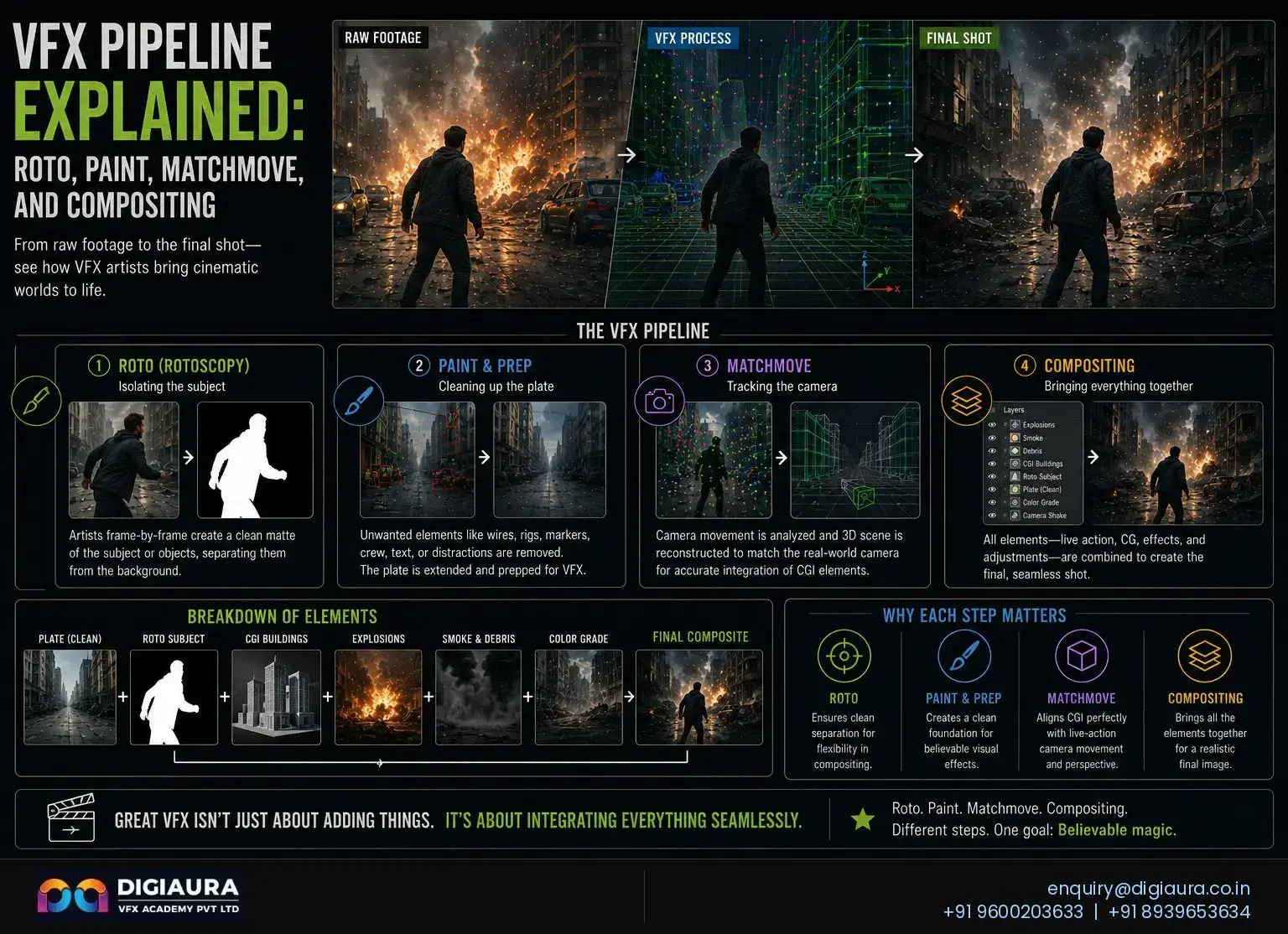
For students interested in the broader VFX pipeline that rotoscopy feeds into, covering how roto mattes are used downstream in paint, compositing, and matchmove departments, read our complete pipeline guide: VFX Pipeline Explained: Roto, Paint, Matchmove, and Compositing →
Frequently Asked Questions About Rotoscopy and Background Removal
How do movies remove backgrounds without a green screen?
Movies remove backgrounds without a green screen using rotoscopy: a technique where VFX artists trace the silhouette of the foreground subject frame by frame to produce a digital matte. That matte separates the subject from the background so the compositor can replace the original background with any digital environment. Rotoscopy works on any footage regardless of what is behind the subject, making it the only option for location footage, archival material, and any scene not filmed on a controlled stage.
What is the difference between rotoscoping and green screen?
Green screen (chroma keying) uses colour detection to make the background transparent automatically. It requires a green or blue screen set up on set before filming. Rotoscopy traces the actual subject silhouette frame by frame after filming, requiring no special setup on set. Green screen is faster and cheaper for simple subjects in controlled studio conditions. Rotoscopy is more accurate for complex edges and is the only option when no green screen was used during filming.
Which famous movies used rotoscopy?
Star Wars (1977) used rotoscopy to create the lightsaber effect. A Scanner Darkly (2006) and Waking Life (2001) used interpolated rotoscopy as their primary visual style. A-ha's "Take on Me" music video used rotoscopy across 3,000 frames over 16 weeks. Marvel and DC films use rotoscopy extensively for action sequences filmed on practical locations. Almost every major VFX production uses rotoscopy at some stage of the pipeline regardless of whether green screens were also used on set.
Has AI replaced rotoscopy artists?
AI has not replaced rotoscopy artists in 2026. AI-assisted tools including Adobe Roto Brush 2 and RunwayML can generate initial matte passes quickly on simple footage, but they fail on complex edges such as hair, translucent fabric, fast motion blur, and overlapping subjects. Trained roto artists now increasingly supervise and correct AI-generated mattes while manually handling complex shots that AI cannot process to feature-film quality standards.
How long does rotoscopy take per shot?
A simple shot with a single clearly bounded subject and no hair detail takes approximately 100 to 150 frames per day at feature-film quality. A medium-complexity shot takes 60 to 80 frames per day. A complex shot with loose hair, translucent fabric, or multiple overlapping subjects may take 20 to 40 frames per day. At 24 frames per second, a 10-second scene can require two to three days of dedicated roto artist work.
Is rotoscopy a good career in India?
Rotoscopy is a structured and accessible entry point into India's VFX industry. Entry-level roto artists earn Rs 2 to 3 LPA, mid-level artists with 2 to 4 years of experience earn Rs 5 to 7 LPA, and senior artists earn Rs 10 LPA and above. India is one of the world's largest rotoscopy outsourcing hubs, and the country's VFX market is projected to reach USD 1.70 Billion by 2033.
What software do professional roto artists use?
Professional roto artists primarily use Silhouette FX (the industry standard for dedicated rotoscopy), Foundry Nuke (for pipeline-integrated roto work), and Adobe After Effects with Mocha Pro (widely used at mid-size studios and in training). AI-assisted tools such as Adobe Roto Brush 2 and RunwayML are increasingly used for initial passes on simpler footage, with human artists reviewing and correcting the output.
Rotoscopy is the technique that makes impossible shots possible: the archival footage integrated into a modern production, the location-shot sequence that needed a complete background replacement, the actor's hair that no green screen key could ever handle cleanly. It is the foundational discipline that every compositor depends on and every VFX pipeline begins with. For students in India who want a clear, skill-based entry into the VFX industry with a defined learning path and genuine employment demand, rotoscopy remains one of the most reliable routes into a professional VFX career. Speak with DigiAura's team about starting your rotoscopy training →