
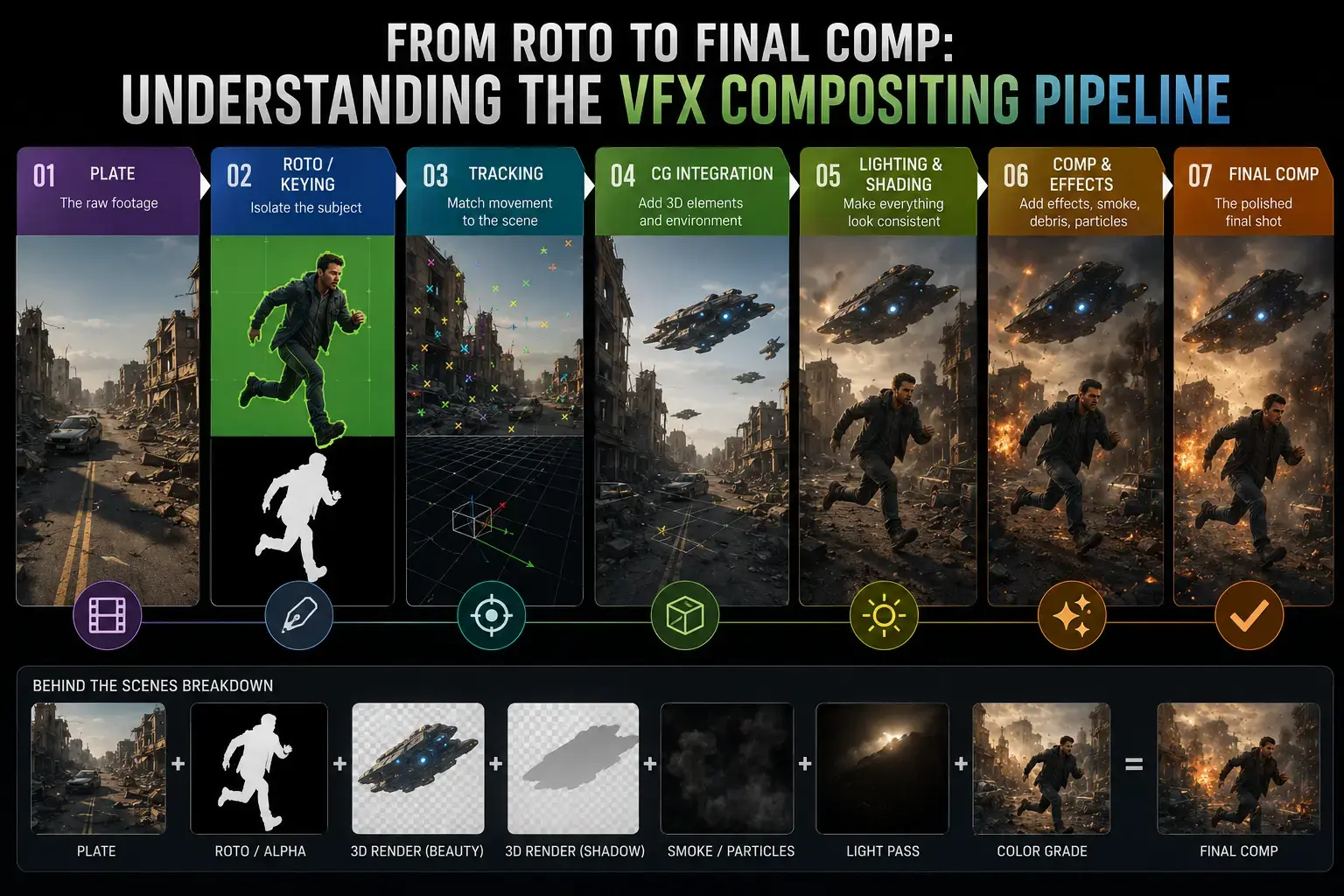
Every finished VFX shot you see in a film or streaming series is the result of a precise, multi-stage process that begins long before any 3D rendering or compositing takes place. Roto artists isolate subjects frame by frame. Paint artists scrub out wires and rigs. Matchmove artists reconstruct the camera in 3D space. CGI artists render digital elements in layers. And then the compositor takes all of these pieces and assembles them into the single final frame the audience sees on screen. Understanding how this pipeline works from roto to final comp is essential whether you are a student choosing a VFX specialisation, a professional exploring where compositing fits into the broader workflow, or someone who simply wants to understand how blockbuster VFX is actually made.
Key Takeaways
- VFX compositing is the final creative stage where all visual elements, including live-action footage, roto mattes, CGI render passes, and colour grades, are combined into a seamless photorealistic shot.
- The full compositing pipeline has six stages: rotoscoping, paint and prep, camera tracking, 3D CGI rendering, compositing, and final output with quality control.
- Foundry Nuke is the industry standard compositing software at major studios globally. Adobe After Effects dominates broadcast and advertising. Blackmagic Fusion is the best free alternative.
- 3D CGI elements are delivered to compositors as multiple render passes (beauty, diffuse, specular, shadow, ambient occlusion, depth) giving full per-element control without re-rendering.
- Junior compositors in India earn Rs 18,000 to Rs 40,000 per month. Senior compositors and leads earn Rs 1,00,000 to Rs 2,00,000 per month or more (Glassdoor India and AmbitionBox, 2025 to 2026).
- India's animation and VFX industry is projected to reach Rs 48 billion by 2028 (FICCI-EY Report 2026), sustaining strong demand for trained compositors.
- Compositing is a discipline that requires equal parts technical software knowledge and artistic judgment about light, colour, and photorealism.
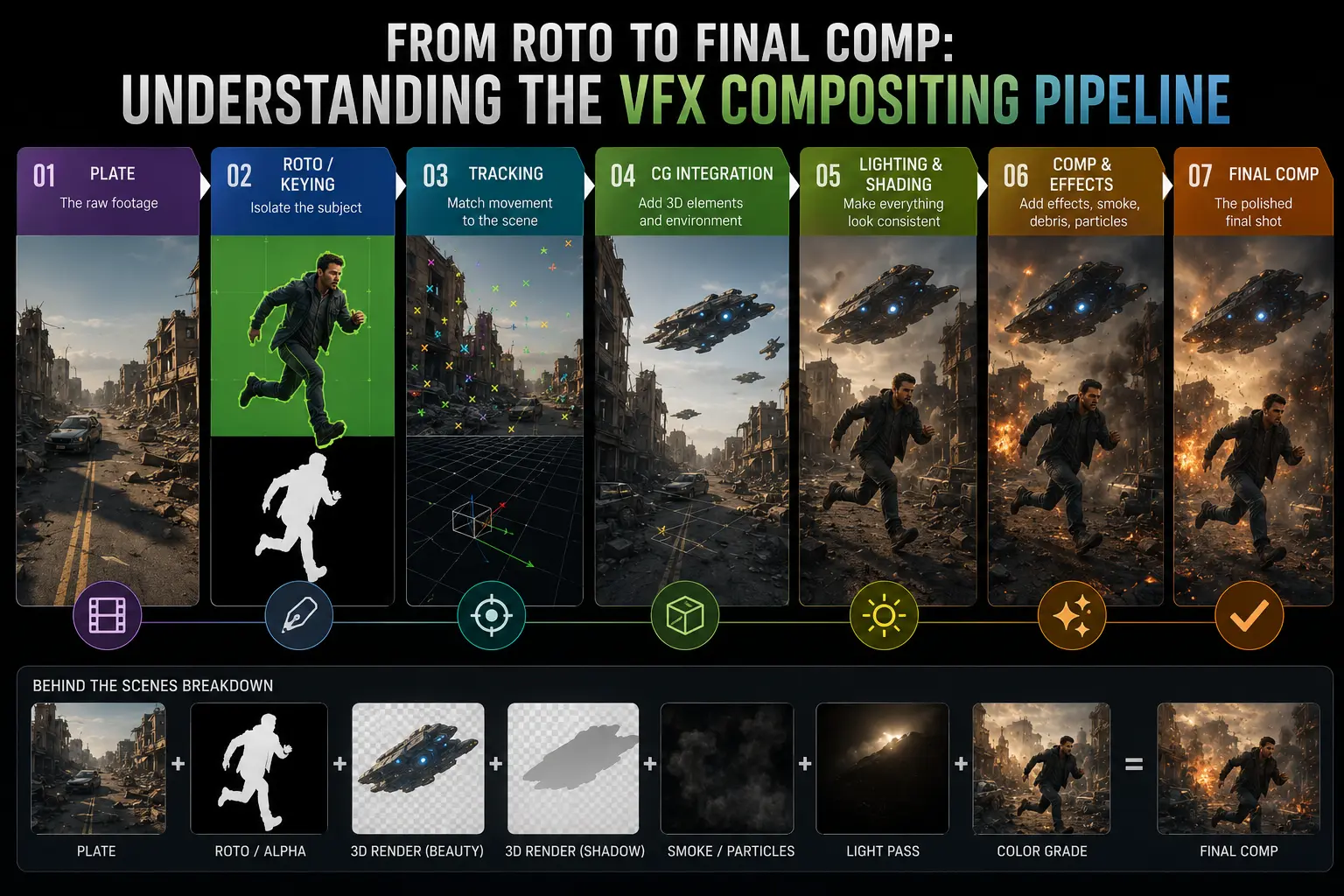
The VFX compositing pipeline combines rotoscoping, 3D render passes, and colour grading into a single photorealistic final frame using software like Nuke or After Effects.
What Is VFX Compositing?
VFX compositing is the process of combining multiple separately created visual elements into a single, photorealistic final image or sequence of images. A compositor takes live-action footage from the camera, mattes and isolation layers from the roto department, cleaned plates from the paint department, camera data from the matchmove department, 3D rendered elements from the CGI department, and combines them in software so every element appears to exist in the same physical space, under the same lighting, and in the same lens environment.
The word compositing comes from the idea of combining, or compositing, multiple image layers together. In the analogue era, this was done optically by exposing film multiple times or using optical printers. In the digital age, compositing is done entirely in software. The result, when done well, is a frame that looks as if everything the audience sees was captured in a single camera take.
Compositing is the final creative gate in the VFX pipeline. Every department's work flows into the compositor's hands, and it is the compositor who determines whether the final shot passes or fails the photorealism test. This makes compositing one of the most technically demanding and artistically critical roles in visual effects. For a foundational overview of compositing concepts before diving into the pipeline mechanics, the DigiAura guide to what compositing is and how the layers work together covers the definitions and conceptual foundations in full.
Where Compositing Sits in the Full VFX Pipeline
To understand compositing, it helps to see it in the context of the complete VFX workflow. A VFX shot travels through multiple departments before it reaches the compositor. Each department processes the shot and hands off their output to the next team. The sequence below represents a typical feature film or streaming series VFX pipeline.
| Pipeline Stage | Department | Output to Compositor |
|---|---|---|
| 1. Rotoscoping | Roto / Paint Department | Alpha matte image sequences (EXR/TIFF) isolating subjects from background |
| 2. Paint and Prep | Paint / Prep Department | Cleaned live-action plate with wires, rigs, and unwanted elements removed |
| 3. Camera Tracking | Matchmove Department | Solved 3D camera data and scene geometry for projection and CG integration |
| 4. 3D CGI Renders | 3D / Lighting / FX Department | Multi-pass EXR render sequences (beauty, diffuse, specular, shadow, AO, depth) |
| 5. Compositing | Compositing Department | Fully integrated, colour-matched, graded final shot delivered to editorial |
| 6. Output and Delivery | Compositing / DI / Delivery | Final approved frames in DPX, EXR, or ProRes at broadcast/cinema specification |
Stage 1: Rotoscoping and Alpha Mattes
Rotoscoping is the foundational isolation technique in VFX compositing. A roto artist draws precise shapes around subjects in the live-action footage, frame by frame, to create an alpha matte, which is a black-and-white image where white represents the subject and black represents the background. This matte allows the compositor to separate the actor, object, or element from its original background so it can be placed over a new one or have CG elements placed behind it.
Without accurate rotoscoping, the compositor cannot separate foreground subjects from their backgrounds cleanly, and the entire integration of CG elements falls apart. A roto matte that slips by even two pixels along a hard edge will produce a halo or fringing artefact visible on screen. This is why large roto departments at studios employ dozens of artists on a single feature film.
Rotoscoping is covered in depth in the DigiAura guide to rotoscopy and frame-by-frame VFX. In the compositing pipeline, the roto artist delivers alpha matte sequences (usually as EXR or TIFF image sequences) which the compositor plugs directly into their Nuke script or After Effects composition as mask channels.
Stage 2: Paint, Prep, and Clean Plates
Paint and prep is the process of removing unwanted real-world elements from live-action footage before compositing begins. This includes wire removal (erasing the safety wires used in stunts), rig removal (removing motion-capture suits, camera cranes, and other equipment that ended up in frame), logo removal, continuity fixing (removing a crew member who walked into frame), and background preparation (creating clean versions of backgrounds for use as compositing plates).
The output of the paint department is the "clean plate", a version of the live-action footage with all unwanted real-world elements erased. This clean plate forms the foundation of the compositor's work, as every element placed into the shot needs to sit correctly on top of this cleaned background.
For a detailed breakdown of what paint and prep artists do in a VFX facility, the complete guide to paint and prep in the VFX pipeline covers the full workflow including wire removal, beauty work, and clean plate creation techniques.
Stage 3: Camera Tracking and Projection Data
For any shot where the camera is moving and needs to have 3D CG elements integrated into it, the matchmove (camera tracking) department provides the compositor with a solved 3D camera. This data tells the compositor, and more importantly the 3D artists, exactly where the real camera was in space at every frame of the shot, including its position, rotation, focal length, and lens characteristics.
The compositor uses this camera data in several ways. First, it ensures that any 3D rendered CG elements (characters, vehicles, environments) were rendered from exactly the right viewpoint to match the original live-action plate. Second, it allows the compositor to project textures or reference images onto 3D geometry to extend or replace backgrounds. Third, it enables accurate placement of 2D elements that need to track to specific real-world positions in the scene.
The full process of how camera tracking works in a professional VFX pipeline is explained in the beginner's guide to matchmove and camera tracking in VFX. Understanding matchmove is important for compositors because they often need to troubleshoot integration problems that stem from solve errors.
Stage 4: 3D CGI Rendering and Render Passes
The 3D department (which includes modellers, texture artists, riggers, animators, FX artists, and lighters) produces the computer-generated visual elements that the compositor needs to integrate into the shot. These elements are delivered not as a single finished image, but as a series of separate layers called render passes (also called AOVs, Arbitrary Output Variables, or render elements depending on the software used).
Rendering in passes gives the compositor precise control over the look of each CG element without requiring the 3D department to re-render. Instead of requesting a completely new render when a shadow looks too dark, the compositor can simply reduce the opacity of the shadow pass. This saves enormous amounts of time on productions where render farm hours are expensive and schedules are tight.
Common VFX Render Passes Explained
- Beauty Pass: The final combined render of all components. Used as a reference but composited from individual passes for maximum control.
- Diffuse Pass: The flat base colour of the surface with no specular highlights or reflections. Shows the raw albedo of the material.
- Specular Pass: Only the shiny highlights and reflections on the surface. Added on top of diffuse in compositing to control shininess independently.
- Ambient Occlusion (AO) Pass: A greyscale pass showing contact shadows where surfaces meet and in crevices. Multiplied over the diffuse to add depth and grounding.
- Shadow Pass: Only the shadows cast by the CG element onto the ground or other surfaces. Allows compositors to adjust shadow density and colour to match the live-action lighting.
- Reflection Pass: Only the reflected imagery visible on the surface. Useful for adjusting environment reflection intensity independently.
- Depth Pass (Z-Depth): A greyscale image where pixel brightness represents distance from the camera. Used to add depth of field blur to CG elements in compositing, matching the focus characteristics of the real lens.
- Motion Vector Pass: Encodes the direction and speed of pixel movement. Used for motion blur synthesis in compositing without re-rendering.
- Normal Pass: Encodes the direction that each surface is facing. Used for relighting CG elements in compositing to match changing live-action lighting conditions.
Stage 5: The Composite Itself
With all the inputs assembled, the compositor builds the actual composite. In Nuke, this is done by constructing a node graph where each node represents a specific operation on the image data. In After Effects, it is done by stacking and blending layers in a timeline. Either way, the compositor's core job at this stage is to blend all the visual elements so convincingly that no audience member can detect the seams between what is real and what is digital.
Keying and Green Screen Extraction
When live-action footage was shot against a green or blue screen, the compositor must pull a chroma key to remove the coloured background. This involves selecting the range of green or blue hues in the image and making those pixels transparent, creating an alpha matte of the subject. Modern keying tools in Nuke (Keylight, IBK Keyer) and After Effects (Keylight, Ultra Key) make this process highly refined, but every key still requires manual cleanup, edge refinement, and spill suppression to remove green colour contamination from the edges of hair, translucent fabric, and reflective surfaces.
CG Integration and Colour Matching
CG elements rendered in a 3D package arrive looking different from live-action footage because they are rendered in a neutral, high-dynamic-range linear colour space (usually ACES or scene-linear). The compositor must match the look of these CG elements to the live-action plate by adjusting their colour, contrast, saturation, and grain to match the specific camera, lens, and lighting conditions of the footage. This is one of the most artistically demanding aspects of compositing and requires a strong eye for colour and light.
Blending Render Passes
The compositor assembles the render passes into a complete CG element by adding and multiplying the individual passes together. A typical assembly in Nuke might add the beauty pass as a base, then add the specular pass, multiply the AO pass to deepen contact shadows, overlay the shadow pass at reduced opacity onto the live-action plate, and apply the depth pass as a mask for a lens blur effect. This gives the lighting artist and the compositor fine-grained control over every aspect of how the CG element appears.
Edge Work and Integration Details
Integration is not complete until the edges of CG elements look physically correct against the background. The compositor adds edge-level details including contact shadows (the subtle darkening where a CG object meets a surface), edge softening to match lens characteristics, lens flares from in-world light sources, atmospheric depth haze, and grain matching so the noise texture of CG elements matches the camera sensor noise of the live-action plate. These micro-adjustments are invisible when done correctly and glaringly obvious when omitted.
Stage 6: Final Output and Quality Control
Once the compositor considers a shot finished, it enters the review and quality control stage. The shot is reviewed on a calibrated display in the studio's review room, usually by the compositing lead, VFX supervisor, and sometimes the director or director of photography. Each reviewer checks the shot for integration accuracy, colour consistency against adjacent shots, edge quality, motion, and overall photorealism.
Feedback from reviews generates a list of changes called "notes". The compositor addresses these notes and resubmits for review. This cycle repeats until the shot receives "final" approval. The number of review passes a shot requires varies enormously: a simple wire removal might pass after one review, while a complex hero CG character shot might require twenty or thirty rounds of refinement.
Approved shots are rendered to the required delivery format, which in modern production is typically a high-resolution EXR or DPX sequence for feature film work, or a ProRes or MXF file for broadcast and streaming. These final frames are handed to the editorial team to be cut into the locked picture, and ultimately to the digital intermediate (DI) team for the final colour grade of the completed film.
VFX Compositing vs Video Editing: What Is the Difference?
Many people who are new to the industry confuse compositing with video editing, since both involve working with footage in software. The difference is fundamental. A video editor works with whole shots as building blocks, cutting and arranging clips in a timeline to build a narrative sequence. A compositor works inside a single shot, manipulating the individual pixels within a frame to blend different elements together.
| Aspect | Video Editing | VFX Compositing |
|---|---|---|
| Primary job | Cutting and sequencing shots to build story | Blending multiple elements within a single shot |
| Working unit | Whole clips and shots | Individual pixels and image layers |
| Primary software | Premiere Pro, Final Cut Pro, Avid Media Composer | Nuke, After Effects, Fusion, Flame |
| Key skills | Storytelling, pacing, narrative judgment | Colour science, light matching, technical software |
| When it happens in production | During post-production, alongside VFX | During post-production, after 3D and roto are complete |
| Output | Assembled cut of the full film or episode | Individually finished VFX shots delivered to editorial |
2D Compositing vs 3D Compositing
Within compositing itself, there is a distinction between 2D and 3D compositing approaches. 2D compositing refers to blending flat image layers on top of each other in 2D space, similar to stacking transparencies. This approach works well for screen replacements, title cards, simple green-screen work, and shots where no spatial depth is needed. After Effects began as a primarily 2D compositing tool and remains dominant in this space.
3D compositing refers to working with actual 3D geometry, cameras, and lights inside the compositing application. Nuke has robust 3D capabilities that allow compositors to project textures onto 3D geometry, work with 3D point clouds from matchmove data, render simple 3D geometry in-comp for atmosphere and environment extensions, and simulate camera movements on flat elements using 3D camera rigs. This 3D capability is one of the main reasons Nuke is the professional standard for complex VFX work.
Most professional VFX shots on feature films involve 3D compositing, because CG integration requires working with actual 3D space to ensure correct perspective, parallax, and depth. 2D compositing remains common and valuable in broadcast, advertising, motion graphics, and simpler production contexts.
VFX Compositing Software: Nuke, After Effects, and Fusion Compared
Three compositing applications dominate the professional VFX and post-production landscape. Understanding the differences between them is important for anyone planning a compositing career, because the software you specialise in has a direct impact on the types of studios and roles you can access.
| Software | Workflow Type | Primary Use | Cost (2026) | Industry Level |
|---|---|---|---|---|
| Foundry Nuke | Node-based | Feature film, streaming, high-end VFX | Rs 2,50,000+ per year (commercial) | Industry standard at major studios |
| Adobe After Effects | Layer-based | Broadcast, advertising, motion graphics | Part of Adobe Creative Cloud subscription | Standard in broadcast and advertising |
| Blackmagic Fusion | Node-based | Feature film, broadcast, indie production | Free (Fusion Studio Rs 25,000 approx) | Growing adoption; Nuke alternative |
| Autodesk Flame | Node + Timeline hybrid | High-end broadcast, commercials, colour finishing | Very high, subscription-only | Premium broadcast and commercials facilities |
For students in India planning a career in VFX feature film production, Nuke is the essential software to learn. Blackmagic Fusion provides an excellent free alternative for building foundational node-based compositing skills while Nuke proficiency is being developed. After Effects is a valuable secondary tool, particularly for broadcast and motion graphics work. Flame is typically learned on the job at senior levels.
How Green Screen Compositing Works
Green screen (chroma key) compositing is one of the most recognisable VFX techniques in film and television. Despite being well-known by the public, producing a clean, professional-quality chroma key composite is a highly skilled process that requires careful work at every stage, from lighting on set to final refinement in compositing.
Step 1: On-Set Green Screen Lighting
A successful chroma key begins on set. The green screen must be lit evenly and separately from the subject, so there is no spillage of green light onto skin, hair, or costume. An unevenly lit green screen produces a screen with varying shades of green, making it impossible to pull a clean key. A well-lit green screen is uniformly bright green with no hotspots, dark corners, wrinkles, or shadows from the set or performers.
Step 2: Pulling the Key
In compositing, the artist pulls the key by selecting the green colour range using a keying tool. In Nuke, the primary keying tools are Keylight and the IBK (Image-Based Keyer). The keyer analyses the colour values of the screen and creates a matte where the screen colour is transparent (black in the alpha) and the subject is opaque (white in the alpha). The quality of this initial key depends directly on the quality of the on-set green screen lighting.
Step 3: Matte Refinement and Spill Suppression
The raw key almost always needs refinement. Fine hair, transparent fabric, and motion-blurred edges require additional edge softening and matte erosion to look convincing. Green spill, the contamination of the subject's edges with the reflected green light from the screen, must be suppressed by shifting those edge pixels toward a complementary colour (magenta or red) to neutralise the green cast. Garbage mattes (rough masks hand-drawn around the usable area of the frame) are used to eliminate unwanted equipment, studio walls, and lighting rigs that appear at the edges.
Step 4: Background Integration and Colour Matching
With the subject cleanly isolated, the compositor places the keyed element over the background plate. The final step is matching the colour, contrast, and lighting of the keyed subject to the new background. If the background is sunlit and warm, the subject's skin tones and costume must be colour-graded to match the same warm quality of light. Contact shadows from the subject's feet onto the ground may be added using CG renders or 2D painting. Ground bounce and ambient light from the background environment may be added as a colour tint over the subject's lower half.
Skills a Professional VFX Compositor Needs
Compositing is one of the most multidisciplinary roles in the VFX industry. A strong compositor must be both technically proficient in software and artistically developed in their understanding of light, colour, and photographic realism. Neither technical skill alone nor artistic eye alone is sufficient.
Technical Skills Required
- Proficiency in Nuke (node building, scripting, 3D space, multi-channel EXR handling)
- Understanding of colour science: linear light, colour management, LUTs, ACES workflow
- Knowledge of keying techniques: Keylight, IBK, luminance keying, difference mattes
- Ability to read and blend render passes (beauty, diffuse, specular, AO, shadow, depth)
- Understanding of rotoscoping and how roto mattes are used in compositing
- Familiarity with tracking: 2D tracking, planar tracking, using 3D camera solve data
- Basic understanding of 3D rendering pipelines (Arnold, V-Ray, RenderMan) to communicate with lighters
- Knowledge of grain matching, lens distortion, and depth of field simulation
Artistic Skills Required
- Strong observational eye for light direction, quality, and colour temperature
- Understanding of photography: how focal length, aperture, and exposure affect image characteristics
- Ability to identify what makes a composite look "wrong" and diagnose the specific technical correction needed
- Colour grading judgment: knowing when colour corrections enhance integration vs when they are overcorrected
- Sensitivity to texture and surface characteristics: matching CG material texture to live-action footage
- Understanding of how the human eye perceives depth, atmosphere, and focus in real photographs
VFX Compositor Career Path and Salary in India 2026
Compositing is one of the strongest career paths in the Indian VFX industry because it sits at the apex of the shot pipeline. Every shot that goes out the door of a VFX studio passes through the compositing department. This means compositors are always in demand and are among the highest-paid technical artists in a VFX facility after supervisors.
| Experience Level | Typical Role | Monthly Salary (India, 2026) | Key Software Required |
|---|---|---|---|
| 0 to 2 years | Junior Compositor / Compositor Trainee | Rs 18,000 to Rs 40,000 | Nuke, After Effects |
| 2 to 5 years | Mid-Level Compositor | Rs 45,000 to Rs 90,000 | Nuke (advanced), Python scripting |
| 5 to 8 years | Senior Compositor | Rs 90,000 to Rs 1,80,000 | Nuke, deep compositing, Flame |
| 8+ years | Compositing Lead / Supervisor | Rs 1,80,000 to Rs 2,80,000+ | Nuke, pipeline tools, leadership |
Salary data is based on listings from Glassdoor India and AmbitionBox for compositing roles in India between 2025 and 2026. Major cities for VFX compositing employment in India include Mumbai (the largest VFX hub), Hyderabad, Chennai, Bengaluru, and Pune. Mumbai-based studios typically offer the highest compensation, particularly for senior and lead roles.
India's animation and VFX industry is projected to reach Rs 48 billion by 2028 according to the FICCI-EY Media and Entertainment Report 2026, representing a compound annual growth rate of approximately 10%. This sustained growth, driven by demand from international studios outsourcing VFX work to India and by the rapid expansion of original Indian streaming content, means compositing careers remain among the most stable and lucrative in the Indian creative industry.
How to Learn VFX Compositing in India
Learning VFX compositing to a professional standard requires a structured programme that covers both the theoretical foundations (colour science, image formation, pipeline workflow) and the practical technical skills (Nuke, render pass assembly, keying, integration). The self-taught route is possible but significantly slower and harder to make job-ready without structured feedback from experienced compositors.
A typical structured compositing programme in India runs from 9 to 12 months for the core skills. This is typically followed by an internship or junior position at a VFX studio, where real-world production experience accelerates skill development far faster than any training environment alone. The combination of structured training followed by production experience is the fastest reliable path to a mid-level compositing career.
What to Look for in a VFX Compositing Course in India
- Nuke as the primary compositing software taught, not just After Effects
- Training on real multi-pass EXR renders, not simplified single-layer exercises
- Coverage of the full pipeline: roto, paint, tracking, CGI, and compositing as connected stages
- Colour science and colour management (ACES workflow, linear light) included in the curriculum
- Practical shot exercises based on real production scenarios rather than purely theoretical assignments
- Industry-connected instructors with actual studio compositing experience
- Portfolio development as part of the course structure
- Industry placement or assistance with job preparation at course completion
Common VFX Compositing Mistakes Beginners Make
Understanding where beginners go wrong is as valuable as understanding what to do right. These are the most frequent compositing mistakes made by students and junior artists at the start of their careers.
Ignoring Colour Space and Working in the Wrong Gamma
The most common and most damaging beginner mistake is working in display-referred colour space (sRGB, 1/2.2 gamma) instead of linear light. Compositing in the wrong colour space produces incorrect blending, wrong depth of field blur, and inaccurate colour corrections. Every professional compositing pipeline uses linear light for all image processing, with display transforms applied only at the final output stage. Learning colour management from the start is non-negotiable.
Not Matching Grain and Texture
CG renders are mathematically perfect and noise-free, while live-action camera footage contains sensor noise (grain). When a clean CG element is placed into grainy footage without adding matching grain to the CG element, the brain immediately detects the difference in texture even if it cannot articulate why. Adding matching grain to CG elements, and matching the grain pattern to specific camera footage, is one of the most effective single steps for improving the believability of a composite.
Overlooking Contact Shadows and Edge Detail
A CG object that appears to float above a surface rather than rest on it is almost always missing its contact shadow. The subtle darkening of a surface where an object rests on it is one of the primary perceptual cues the eye uses to judge whether objects are physically present in a space. Adding a soft, low-opacity contact shadow pass beneath every CG element that interacts with a surface is a relatively simple correction with a disproportionately large impact on integration quality.
Over-reliance on a Single Keying Tool
No single keying tool produces a perfect result for every type of footage. Beginners often try to push one keyer to handle all their chroma key needs. Professional compositors build composite keys by combining the outputs of multiple keyers and hand-painted mattes, using each tool for what it does best. Keylight may produce the cleanest inner matte while IBK preserves fine hair detail at the edges. Learning to build composite mattes from multiple sources is a mark of compositing maturity.
How AI Is Changing the Compositing Pipeline in 2025 and 2026
Artificial intelligence is beginning to change several stages of the VFX compositing pipeline, particularly in the labour-intensive areas of rotoscoping and paint. According to the FICCI-EY Report 2025, AI adoption in roto, paint, and pipeline orchestration is delivering up to 40% time savings at Indian VFX facilities that have integrated these tools into their workflows. This is a significant shift in an industry where roto and paint work have historically been among the most time-consuming and headcount-heavy stages of production.
AI-Assisted Rotoscoping
AI-powered roto tools use machine learning to automatically detect and segment subjects in footage, reducing the manual frame-by-frame drawing that was previously done entirely by hand. Tools like Runway ML and Beeble provide machine-learning-based segmentation that can draft initial mattes across a sequence. Silhouette FX and Mocha Pro have integrated AI tracking and segmentation features. Nuke itself includes AI-powered tools through the Nuke Assist suite. However, all current AI roto tools require significant human review and correction, particularly on complex hair, translucent fabric, fast motion, and shots with overlapping subjects. The roto artist's role is shifting from pure frame-by-frame drawing to supervising and correcting AI-generated mattes, which is a fundamentally different skill set requiring strong critical evaluation rather than raw manual speed.
AI in Compositing: What Changes and What Does Not
At the compositing level, AI tools are emerging for automatic colour matching, grain matching, and edge integration refinement. However, the core judgment of a compositor, which is the artistic assessment of whether a shot looks photoreally correct, remains a human skill that current AI cannot replicate. AI is most valuable in compositing as a time-saving assistant for technically repetitive tasks, not as a replacement for the compositor's visual intelligence. The compositors who will be most competitive in the market over the next decade are those who understand how to leverage AI tools to accelerate their workflows while maintaining the human quality control that production requires.
What This Means for VFX Students in India
- Learning AI-assisted roto and compositing tools is now part of becoming job-ready, not an optional extra.
- The 40% time saving from AI roto means studios can take on more shots per budget, which increases overall demand for compositing artists rather than reducing it.
- The roto artist role is evolving toward roto supervision and quality control, requiring stronger artistic judgment and weaker reliance on raw manual speed.
- Compositors who can work with both traditional Nuke workflows and AI-assisted pipeline tools will be the most employable candidates at modern Indian and international studios.
- Understanding colour science, render passes, and integration principles remains essential regardless of which specific tools are used to execute those tasks.
VFX Compositing Pipeline: The Complete Picture
The VFX compositing pipeline is not a single process but a coordinated sequence of specialist disciplines. Roto artists provide the isolation mattes that allow compositors to separate foreground from background. Paint artists remove the real-world elements that should not be in the shot. Matchmove artists supply the 3D camera data that allows CG elements to be placed correctly in space. 3D artists provide the rendered elements in multi-pass EXR format. And compositors assemble all of these contributions into a finished frame that must pass the scrutiny of directors, VFX supervisors, and ultimately the audience.
Each of these stages requires different software, different skills, and different ways of thinking. But every stage is connected to every other stage, and understanding how the full pipeline works is what separates a well-rounded compositor from someone who can only operate software. The best compositors in India and globally are those who understand what roto artists need to deliver, what matchmove data means, and what a 3D lighter is trying to achieve with their render passes, because that understanding is what allows them to problem-solve quickly when something does not integrate correctly.
Whether you are beginning your journey in VFX from the roto department, training directly in compositing, or moving from 3D into comp work, the compositing pipeline is the thread that connects every visual effects discipline. Mastering it is the foundation of a long and varied career in one of India's fastest-growing creative industries.